When images break after a CMS migration, it is almost never because the pictures were deleted. It is because an image in a post is two separate things, the file and the reference to it, and a move can carry one without the other. That is why the symptom is usually “half my pictures are gone” rather than all of them or none of them. Before you fix anything, work out which of the two halves you are missing, because the repair for a missing file and the repair for a broken reference have nothing in common.
Do not start repairing until the backup and rollback plan is in place and verified. Specifically: keep the source platform running and untouched, and keep the original export file. Both are the only complete record of what the images were supposed to be, and a well-meaning bulk fix on the new platform can turn a recoverable problem into an unrecoverable one in a single pass. The rollback here is that the source platform still holds the truth, so do not retire it while you are still finding gaps.
An image in a post is two things
This is the whole of the problem and it is worth being precise about, because every other question in this article resolves back to it.
The file is the actual image sitting in storage. In most platforms it also has a record attached to it, a library entry that knows the file exists and holds information about it.
The reference is what is written inside the post body, pointing at that file. Depending on the platform it might be an HTML tag with a full URL in it, a platform-specific block, or an identifier that the platform resolves at the moment the page is drawn.
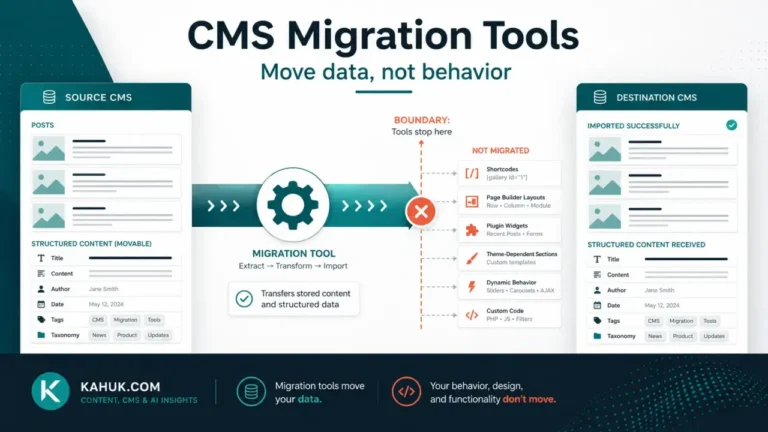
A CMS-to-CMS migration has to move both of these and make them agree with each other on the far side. There are three ways that goes wrong and they produce visibly different symptoms:
- The files did not come. References point at addresses where nothing exists. Every affected image is missing.
- The files came but the references were not rewritten. The images are sitting in the new platform’s library, and the posts are still pointing at the old platform’s addresses. The pictures may still display, because the old platform is still serving them, which is the trap in this case. The day the old site goes away, they all break at once.
- Both came, but not all of them. Partial transfers are common in exports that hit a limit, a timeout or a file the process could not read. This is the “half of them” case and it is the most common.
Working out which failure you actually have
Do this before touching anything, because it takes minutes and it determines everything after it.
Open a broken image’s address directly. Right-click a missing image, copy its address, and load that address on its own. What comes back tells you most of what you need:
- The image loads, but the address belongs to the old platform or old domain: the files are fine and the references were not rewritten. This is the case that looks healthy today and fails completely later.
- The address belongs to the new platform and nothing is there: the reference was rewritten and the file did not come, or it came under a different name.
- The address belongs to the new platform and something is there but it is the wrong picture: the references were rewritten in bulk and mismatched. Stop immediately and check the scale of it, because a bulk operation that mismatched one probably mismatched many.
Then check the new platform’s own media library. If the images are present in the library but not appearing in posts, you have a reference problem. If the library is short, you have a file problem. If the library has them all and posts still show gaps, you have a partial reference problem and need to work out which posts are affected rather than which images.
Those two checks separate the three failures, and they cost almost nothing compared to guessing.
The failure nobody looks for, because the page looks right
Here is the one that does not announce itself.
Alt text, captions, image titles and descriptions are, on most platforms, attached to the image record rather than written into the post body. The post body carries a pointer; the descriptive information lives with the library entry. This is a sensible design and it is also why that information is the part that most often does not survive a move.
The result is a page that looks completely correct. The picture is there, it is the right picture, it is the right size, and the alt text that used to describe it is gone. Nothing on the page indicates this. You will not find it by scrolling, and you will not find it in a broken-link check, because nothing is broken.
Check for this explicitly, on a sample, immediately after import: open several migrated posts in the new platform’s editor and look at the image settings rather than the rendered page. If the descriptive fields are empty on the sample, assume they are empty everywhere and treat re-entering them as a scheduled task with an owner, not as something that will get noticed and fixed as you go. It will not get noticed.
Whether that text should also be doing work for search is a different question with a different answer and it is not this article’s. Here it matters simply as content you had before the move and do not have after it.
Sizes, derivatives and the picture that is present but wrong
Platforms do not store one copy of an image. They generate a set of resized versions and serve whichever one fits the context. The set is specific to the platform: the source made its sizes, and the destination will make its own, and there is no reason for the two lists to match.
This produces two effects worth knowing about.
A reference can point at a size that does not exist on the new platform. If the export wrote out the address of a particular derivative rather than the original, and the destination never generated a derivative by that name, the reference is dead even though the original file arrived safely. The file is there. The specific version being asked for is not.
Images can arrive at the wrong quality. If the migration carried a derivative instead of the original, the new platform now has a smaller image as its master copy and will generate all of its own sizes from that. The page looks acceptable at first and degrades wherever the new platform wants something larger. This is worth checking on a handful of posts that used large images, because it is very hard to spot casually and expensive to correct later.
Checking it properly rather than by scrolling
Scrolling the site is not a check. It is how you find the first few and conclude the problem is smaller than it is.
Work from a list, not from the site. You should know how many images existed on the source platform. Compare that against the count in the destination’s library. A gap is the honest scale of the problem and it is the only number you can trust before you start.
Check the oldest content, not the newest. Recent posts tend to use whatever the source platform’s current handling was. Older posts carry older conventions, and formats that were normal five years ago are exactly the ones a migration path handles worst. This is the same principle behind the 12 things that break in every CMS migration: the failures cluster in the content nobody has looked at recently.
Check posts, not just images. An image can be present and correct while the post around it is pointing somewhere else entirely, which is the subject of repairing internal links after a migration and shows up in exactly the same posts for exactly the same reason.
Check the things that were not plain images. Galleries, sliders, embedded media and anything the source platform rendered through its own special handling are a separate category of problem and are covered in shortcodes, blocks and embeds. A gallery that migrated as a block of unreadable markup will not show up in an image count at all.
Do not bulk-fix until you know the pattern. A single find-and-replace across every post is the fastest way to fix a consistent problem and the fastest way to create an inconsistent one. Establish that the problem is uniform on a sample first. If posts from different periods break differently, you have more than one problem and one operation will not solve both.
For where this sits in the full sequence, the migration guide covers the order these checks belong in.
FAQ
Why did only some of my images break?
Usually because the transfer was partial, or because different posts referenced images in different ways and the migration path handled one way and not the other. Older posts break more often than newer ones for exactly this reason.
My images still show, but the addresses point at my old site. Is that a problem?
Yes, and an urgent one. They are working because the old platform is still serving them. Every one of them fails the moment that site is retired. Rewrite the references before you turn anything off.
Did my alt text and captions come across?
Often not, because they usually live on the image record rather than in the post body. Check a sample in the editor rather than on the rendered page, since a page with no alt text looks entirely normal.
Can I just re-upload the missing images?
You can, but re-uploading does not repair the references in your posts, and it can create duplicate library entries. Find out which failure you have first; if the files are present and the references are wrong, re-uploading adds work without fixing anything.
Should I keep the old platform running while I sort this out?
Yes. It is the only complete copy of both the files and their metadata, and while it is running it is also masking the reference problem in a way that makes it findable. Retiring it early converts a fixable problem into a search through backups.
Written July 2026. Platform import and export behavior changes over time; verify the specifics of your own source and destination platforms before relying on any detail above.