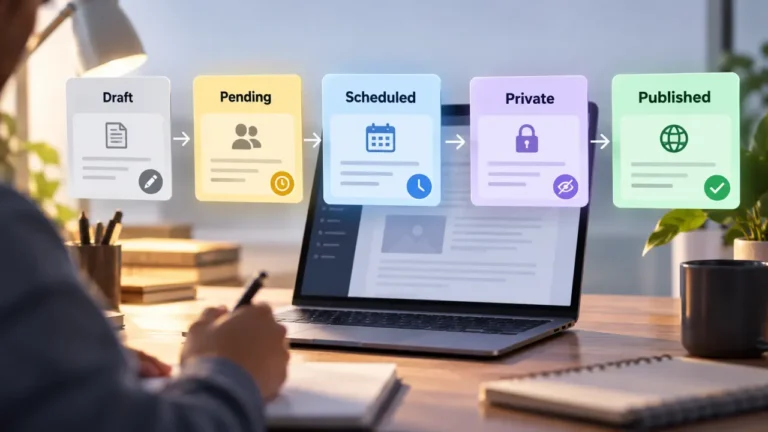
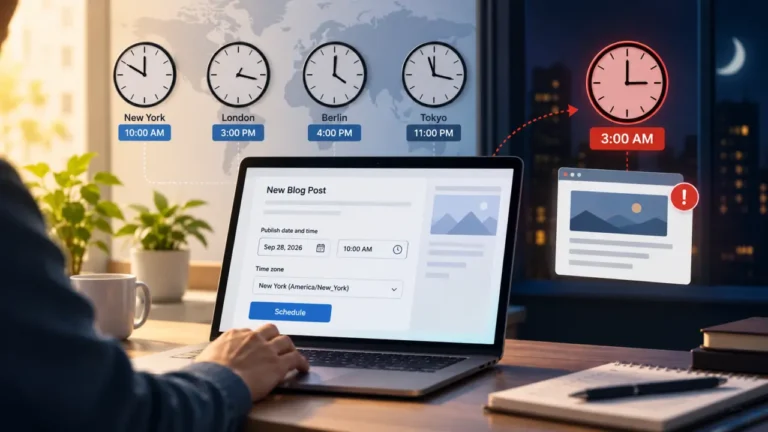
Short answer: a pre-publish checklist for a blog is the last pass between “the editor approved it” and “readers can see it.” It does not re-edit the writing. It checks that the approved piece arrived in your CMS intact: title, URL slug, meta description, links, images and alt text, formatting, category, publish date and time zone, visibility, and any email send. Check the things you cannot undo first, preview on a phone, then publish and look at the live page.
Most blogs that publish regularly have an editing process. Far fewer have a publishing process, and that gap is where “something is always wrong after it goes out” comes from. The piece was fine in the document. Something happened on the way in.
Why a pre-publish checklist is a separate job from editing
Editing and pre-publish checking answer two different questions. Editing asks whether this is the right piece: accurate, clear, on brief, in the house voice. The pre-publish check asks whether the right piece is what is about to go live. By the time a post reaches it, the words are settled. What is not settled is everything the CMS adds around them.
This is why the check belongs to its own stage. If you map your process honestly, you will usually find a gap between “approved” and “published” that nobody owns. The article on the stages every publishing process has names that gap as a stage in its own right, and it is worth treating it that way. The approval itself should come from one person, for the reasons laid out in the case for a single final approver. The pre-publish check comes after that decision and does not reopen it.
Keeping the two jobs apart has a practical payoff. An editor who finds a weak paragraph during the publishing pass is tempted to rewrite it, and a rewrite at that stage skips review. The checklist says what to verify, which also tells you what not to touch.
Sort the checklist by what it costs to fix later
Most pre-publish checklists online are flat lists: proofread, check links, add alt text, write a meta description, pick a category. They are not wrong, but they treat every item as equally urgent. A typo found an hour after publishing costs you a quick edit. An email sent to your whole list with the wrong link cannot be pulled back out of anyone’s inbox.
So order the check by the cost of getting it wrong, and do the expensive items first, while you are still fresh.
| Check | Can you fix it after it goes live? | Why it ranks here |
|---|---|---|
| Email or newsletter send settings | No. A sent email stays sent | Wrong audience, wrong subject line or a broken link reaches every inbox at once |
| Visibility and audience | Not really. Once it is public, people and crawlers may already have seen it | Public vs private vs members-only vs password protected |
| URL slug | Yes, but it breaks every link already shared unless you add a redirect | The slug is the one piece of the post other sites and readers copy |
| Publish date, time and time zone | Partly. A post published at the wrong hour still went out at that hour | A wrong date can also push it into feeds or digests early |
| Title, meta title, meta description, social image | Yes, but first shares may already show the old version | Some platforms keep the preview card from the first share |
| Links, images, formatting | Yes, cheaply | Visible to readers, but a quick edit fixes them |
| Typos | Yes, cheaply | Embarrassing, rarely costly |
If time is short, the bottom rows can slip. The top three cannot.
The transfer layer: what breaks between the document and the CMS
The approved version usually lives somewhere else first: a shared document, a word processor file, a Markdown file, a writing app. Moving it into the CMS is where most publishing errors are born, and flat checklists tend to skip this part. Look for these specifically.
- Heading levels. Pasted headings often arrive as bold paragraphs, or all at the same level. Check that the structure in the editor matches the approved outline.
- Stray formatting. Copied text can bring fonts, colors, spacing or hidden styling with it. On most platforms, pasting as plain text and reapplying formatting is cleaner than cleaning up afterward.
- Links that point to the wrong place. Links to the source document, a comment thread, a staging site or a draft preview URL all look fine to the person who can open them. Click every link while logged out, or in a private browser window.
- Leftover notes. Bracketed reminders, highlighted “check this” lines and writer-to-editor comments are easy to miss in a long piece. Search the body for square brackets and for words like “TBD” before anything else.
- Images. Confirm every image uploaded, has alt text that describes it, and is not a huge original file. Check the featured image crop, because many themes crop it differently on the homepage, the post and the share card.
- Lists and tables. Numbered lists restart, bullets collapse and tables lose columns more often than any other element.
If your writers draft directly in the CMS, this layer shrinks a lot. It never disappears entirely, because settings, previews and delivery still live outside the body text.
The pre-publish checklist for a blog, block by block
Group the items so the person running the check moves through the post settings in one direction instead of hunting around the screen. The labels differ by platform, whether you publish on WordPress, Ghost, Squarespace, Webflow or a Git-based CMS, but the fields are almost always there.
Identity: what the post is called and where it lives
- The title matches the approved title exactly.
- The URL slug is short, readable and final. Change it now, not later.
- The meta title and meta description are filled in and written for a person reading search results.
- The excerpt, if your theme shows one, reads as a summary rather than a truncated first sentence.
- One primary category is set, and tags follow your existing list rather than inventing near-duplicates.
- The author is the right person, not whoever happened to paste the piece in.
Body: what the reader sees
- Headings run in order, with no skipped levels.
- Every link has been clicked from a logged-out browser.
- Every image has alt text, and none is missing or oversized.
- No notes, brackets or placeholder text remain.
- Embeds (video, social posts, forms) load in preview.
Delivery: when and to whom
- Visibility is set to the audience you intend.
- The publish date and time are correct in the site’s configured time zone.
- If the platform can send the post as an email, the send setting, audience segment and subject line are what you intend.
- The social share image and text are set, if your platform lets you set them.
The time zone point catches more people than it should. Ghost’s help center page on publishing and scheduling (read 2026-09-23) states that scheduled times use the time zone configured in the site’s general settings, and the Learn WordPress tutorial on scheduling posts and pages (read 2026-09-23) describes the same arrangement. If the site was set up by someone in a different part of the world, “9am” may not mean your 9am.
Preview: look at it the way readers will
Open the preview on a phone as well as a desktop. A post that looks right on a wide screen can hide a table that overflows, a pull quote that eats the first screen or an image that pushes the opening paragraph out of view. Where your platform offers more than one preview, use them. Ghost’s same help page describes live previews for web and email across desktop and mobile, plus a test email to yourself so you can see the newsletter version in a real inbox. If you send posts as email, that test email is the most valuable step on this list, because it is the only one guarding something you cannot undo.
Decide who presses the button
A checklist with no named owner turns into a checklist everyone assumes someone else ran. Decide in advance who runs the pre-publish check and who presses publish. They can be the same person. It helps if neither is the writer, because the writer reads what they meant to write rather than what is on the screen.
On a team of two, that usually means the writer and the editor swap roles for this one step. On a team of five, it often becomes a rotating job. The editorial workflow for a team of two to five covers how to hand that role around without it quietly disappearing when someone is out.
Whoever owns the button should also own the right to stop. If the check turns up something in the top rows of the triage table, publishing waits. That rule needs to be agreed before the deadline, not argued at it.
The first ten minutes after it goes live
Some things cannot be checked before publishing because they do not exist until the post is live. Build a short after-check into the same checklist so it does not get skipped in the relief of pressing the button.
- Open the live URL from a logged-out browser and confirm it loads.
- Check that the post appears where it should: homepage, category page, the site’s feed.
- Paste the URL into a private message to yourself, or into a platform’s share preview, to see which title, description and image appear.
- If an email went out, open the copy that arrived in your own inbox and click its main link.
- Note anything that went wrong, and decide whether the checklist needs a new line.
That last step is how the list gets better. A mistake that escaped once is a line on the checklist. A mistake that escaped twice means the line is in the wrong place, or the check is happening too late.
Keep the checklist short enough to actually use
A pre-publish checklist fails when it gets long enough that people skim it. Keep it to one screen, and keep it next to the publish button: a pinned document, a template in your project tool, or a checklist feature your platform may offer. Some platforms have add-ons that block publishing until items are ticked off. A shared document works on every platform.
Language and tone decisions do not belong here. Whether you write “email” or “e-mail,” how you format numbers and which words you avoid are editorial choices, and they live in your one-page editorial style guide for the blog. The checklist only confirms that the post in the CMS matches what was approved.
Be honest about the limits, too. A checklist catches mechanical errors: wrong slug, missing alt text, the email set to the wrong list. It does not catch a weak argument, a factual mistake the editor missed or a headline that misreads the audience. Those belong earlier, in editing and approval. If posts keep going out with problems of judgment rather than mechanics, the fix is further up the workflow, and adding lines to this list will not help.
Frequently asked questions
How long should a pre-publish check take?
There is no standard figure, and it depends on the post. As a rule of thumb, it should be clearly shorter than the edit. If the check routinely takes longer than editing did, the list has grown too long or is doing editing’s job, and it needs trimming.
Should the writer run their own pre-publish checklist?
It is better if someone else does. Writers tend to read what they intended rather than what is on the screen. On a solo blog, put time between writing and checking, and read the preview on a different device from the one you wrote on.
Is a pre-publish checklist the same as an editorial checklist?
No. An editorial checklist asks whether the piece is accurate, clear and on brief. A pre-publish checklist assumes that is settled and checks that the approved piece arrived in the CMS correctly, with the right settings, audience and timing.
Do I need a plugin or tool for a blog pre-publish checklist?
No. Some platforms offer add-ons that enforce a checklist before publishing, and they can help on larger teams. A short shared document, kept where the person publishing will see it, works on any platform and moves with you if you ever change CMS.
What should I do if I find a mistake after publishing?
Fix small errors like typos and broken links directly. Be careful with the URL: changing a live slug breaks every link already shared unless you set up a redirect. If the mistake was factual and readers may have acted on it, correct it openly rather than quietly, and add a line to the checklist so the same error does not get through again.