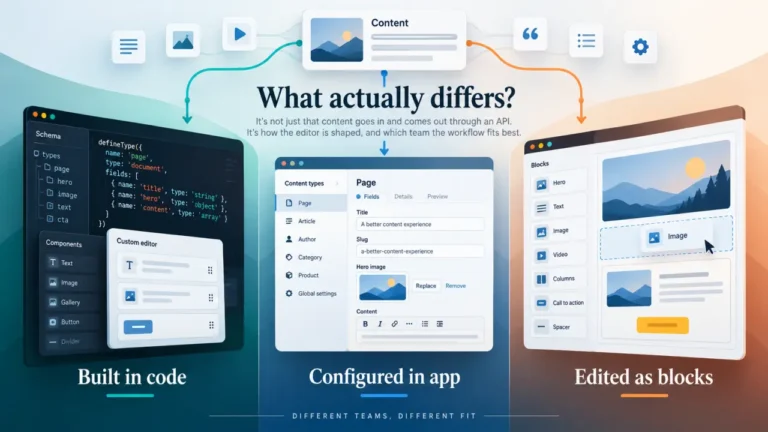
Pages CMS and Keystatic start with a similar idea: your content does not have to disappear into a proprietary CMS database just because writers need a better editing interface.
Both can work with content stored as files in a Git repository. Both are relevant to static sites and modern content-driven websites. And both give developers an alternative to moving Markdown, YAML, or other structured content into a conventional headless CMS.
But the similarity becomes less useful once you look at how the two products actually fit into a website.
Pages CMS behaves primarily like a browser-based editing layer over a GitHub repository. Keystatic behaves more like content tooling that becomes part of the application itself.
That difference affects setup, local development, editor onboarding, authentication, framework coupling, client handoff, and even how comfortably AI-assisted content workflows can fit around the CMS.
So this comparison is not really about which product has the longer feature list. The more useful question is: where do you want the CMS to live in your publishing architecture?
Pages CMS vs Keystatic at a glance
| Area | Pages CMS | Keystatic |
|---|---|---|
| Core approach | CMS interface over a GitHub repository | CMS integrated into the application |
| Configuration | .pages.yml | keystatic.config.ts |
| Content storage | GitHub repository files | Local files, GitHub, or Keystatic Cloud-backed workflow |
| Local-first editing | Not the primary model | First-class local storage mode |
| Framework coupling | Relatively low | Higher |
| Configuration style | YAML | TypeScript |
| Typical starting point | Existing repository that needs an editor | Application where developers want CMS functionality integrated into the project |
| GitHub dependence | Central to the product | Optional during local development; relevant for GitHub mode |
| Best question to ask | How can editors manage this repository? | How should content management fit into this application? |
This table already reveals the main distinction. Pages CMS is easier to think of as something sitting above your repository. Keystatic sits much closer to the application and development environment.
The biggest difference: where the CMS actually lives
With Pages CMS, the GitHub repository remains the center of the system. You configure how Pages CMS should interpret that repository, then editors work through the Pages CMS interface while the underlying files stay where they already live.
A simplified Pages CMS workflow looks like this:
- Your site and content already live in GitHub.
- You add a
.pages.ymlconfiguration file. - Pages CMS reads that configuration and exposes your content through an editor-friendly interface.
- An editor changes content in the browser.
- The resulting content changes go back into the repository.
Keystatic starts closer to the codebase. Developers install and configure Keystatic inside the project. Collections, fields, storage behavior, and other content rules are defined in TypeScript.
A simplified Keystatic workflow looks more like this:
- Install Keystatic packages in the application.
- Create
keystatic.config.ts. - Define collections, fields, storage, and content paths.
- Integrate the Keystatic admin interface into the project.
- Use local files, GitHub, or Keystatic Cloud depending on the workflow you want.
Neither model is inherently more correct. They solve slightly different organizational problems.
Pages CMS asks how little CMS infrastructure you can add to an existing Git repository. Keystatic asks how tightly content management can fit into a developer-controlled application.
Which is easier to add to an existing website?
This is one of the clearest situations where the architectural difference matters.
Imagine you already have an Astro, Hugo, Jekyll, Next.js, or another file-based website. The site builds correctly. Markdown content is already organized. Frontmatter already exists. Deployment already works.
Your problem is not that the website needs a new content architecture. Your problem is that the person writing articles does not want to open VS Code and commit Markdown files.
Pages CMS is a natural fit for that situation because it does not need to become part of your frontend application just to expose those files through a CMS interface.
You still need to describe the repository correctly in .pages.yml. Existing content structures may require careful field mapping. But conceptually, the job is straightforward: teach Pages CMS how to understand content that already exists.
Keystatic can also be added to an existing project, but the relationship is more intimate. You install packages, create a TypeScript configuration, integrate the admin UI, choose a storage mode, and account for the requirements of the framework integration.
That additional integration is not wasted complexity if you want the benefits it provides. But it means Keystatic is usually a bigger architectural decision than simply putting a browser editor in front of an existing repository.
YAML vs TypeScript is more important than it looks
Pages CMS and Keystatic also expose different ideas about who should configure the CMS.
Pages CMS uses a .pages.yml file. A simple content definition can remain relatively compact and separate from the application code.
content:
  - name: posts
    label: Posts
    type: collection
    path: content/posts
Keystatic uses a TypeScript configuration file. Content collections are defined through its configuration API, typically using helpers for collections and fields.
import { config, collection, fields } from '@keystatic/core';

export default config({
  storage: {
    kind: 'local',
  },
  collections: {
    posts: collection({
      label: 'Posts',
      slugField: 'title',
      path: 'src/content/posts/*',
      schema: {
        title: fields.slug({
          name: { label: 'Title' },
        }),
      },
    }),
  },
});
It is tempting to reduce this to “YAML is easier and TypeScript is harder,” but that misses the practical tradeoff.
Pages CMS keeps CMS configuration relatively detached from application logic. That can be attractive when you want the frontend project and the editorial interface to remain loosely coupled.
Keystatic’s TypeScript configuration can be more comfortable for developers who already spend their day inside a TypeScript codebase. Types, code completion, reusable logic, and the ability to keep content modeling close to application development can all be advantages.
The relevant question is not which syntax looks friendlier in a screenshot. It is who will maintain the content model six months from now?
Keystatic has a major advantage for local-first development
Keystatic’s local storage mode is one of the clearest differences between the two products.
A developer can run the project locally, open the Keystatic interface, edit an entry, and have those changes written directly to the local filesystem. There is no need to push every experimental content change through GitHub just to see how the CMS behaves.
This creates a useful development loop:
Code editor ↔ local content files ↔ Keystatic interface
That is especially useful when developers are building new content models, testing fields, restructuring collections, or creating components alongside content.
Pages CMS is much more GitHub-centered. Its strength is not that it gives developers a local CMS environment alongside their application. Its strength is that it can make repository content available through a separate browser interface.
If local authoring is part of your development workflow, Keystatic deserves serious consideration. If your developers are already comfortable editing files locally and the CMS mainly exists for remote editors, Pages CMS’s simpler separation may be more attractive.
Which CMS is easier for non-technical editors?
This comparison changes once the developer leaves the room.
A non-technical editor does not care whether a schema is written in YAML or TypeScript. They care whether they can find an article, change the title, upload an image, update the body, save the work, and understand what happens next.
Pages CMS is particularly easy to understand from this perspective because hiding Git complexity is central to its purpose. The editor interacts with content through the hosted CMS instead of treating GitHub as the editorial application.
Keystatic also provides a structured admin interface, so writers do not need to edit Markdown manually. But the onboarding experience varies more depending on the storage mode you choose.
In direct GitHub mode, GitHub authentication and repository access are part of the workflow. Keystatic Cloud can reduce that burden and allows teams to provide CMS access without requiring every editor to manage the repository in the same way.
That distinction matters for agencies and client websites.
A developer may see “sign in with GitHub” as trivial. A marketing manager may hear “I need access to the source-code repository” and immediately wonder why publishing an article involves a developer platform.
For non-technical teams, the best test is therefore not whether both products have a friendly editor. It is how much of Git remains visible after the developer has finished setting everything up.
Content modeling: both can go beyond simple blog posts
Neither Pages CMS nor Keystatic should be judged using a demo with only a title and Markdown body.
A more realistic publication might need:
- Title
- Slug
- Meta description
- Publication date
- Author
- Category
- Featured image
- Article body
- Related content
- SEO fields
- Reusable structured blocks
Both CMSs can model considerably more than plain text, but they approach that modeling through their respective configuration systems.
Pages CMS can define collections and individual files and map structured fields onto content stored in the repository. Keystatic uses collections, singletons, field definitions, paths, and output formats defined in TypeScript.
For a small blog, the difference may not matter much. For a documentation site, product directory, comparison site, or publication with complicated metadata, the configuration model becomes much more important.
Keystatic’s developer-oriented schema can feel more natural when the content model needs to evolve alongside components and application logic. Pages CMS can be appealing when the content structure should remain understandable as an independent repository-level configuration.
The source files still matter
One of the reasons to choose a Git-based CMS is that the underlying content remains accessible outside the CMS.
That benefit disappears quickly if the CMS turns simple content into source files that humans no longer want to touch.
When evaluating Pages CMS or Keystatic, it is worth opening the repository after creating and editing content through the CMS.
Check questions such as:
- Is the frontmatter still easy to understand?
- Can a developer safely edit the file manually?
- Can an automated script update the file?
- Does the CMS preserve content it does not control?
- Are repository diffs meaningful?
- Could you stop using the CMS without migrating the entire content database?
This is an important advantage of the Git CMS category in general. The CMS is not the only doorway into the content.
Git is not just storage—it becomes part of the publishing workflow
Calling Git “the database” explains only half of what is happening.
Git also gives you history, authorship, diffs, branches, rollback, automation triggers, and the possibility of pull-request-based review.
That can be extremely valuable for developer-heavy teams. A content change can go through many of the same controls as a code change.
But Git can also become the source of editorial friction.
Traditional CMS users expect concepts such as draft, review, scheduled, published, and archived. Git gives you commits and branches. Those concepts can support an editorial workflow, but they are not automatically the same thing.
This is where Pages CMS and Keystatic need to be evaluated in the context of the team rather than the repository.
For a developer and one writer, Git-backed publishing can be refreshingly simple. For a larger newsroom with multiple approval stages, legal review, scheduled campaigns, granular roles, and localization, a lightweight Git CMS may require too much workflow to be assembled around it.
Framework flexibility favors different priorities
Pages CMS is relatively framework-agnostic because its main concern is the structure of files in the GitHub repository.
If your Hugo site and your Astro site both store articles as compatible repository files, Pages CMS does not need to understand every detail of how those frameworks render the final page.
That loose coupling can be useful when the CMS should survive a frontend migration.
Keystatic is more application-aware. Its documented integrations are designed around specific modern frameworks, and the CMS configuration becomes part of the project itself.
This creates a different kind of advantage. Developers can build the content model as part of the same environment where they build the website.
The tradeoff is that changing the application’s framework can have more consequences for the CMS integration than it would with a detached repository editor.
So consider the expected lifetime of the frontend.
If the repository content is the durable asset and frontend frameworks may change, Pages CMS’s separation is attractive. If the application and CMS are being designed together, Keystatic’s integration can be an advantage rather than a liability.
Pages CMS vs Keystatic for Astro
Astro is a particularly useful framework for illustrating the difference.
With Pages CMS, an Astro project can continue treating its content files as Astro content. Pages CMS mainly needs to know where those files are and how their fields should be exposed to editors.
The integration boundary remains relatively clean:
Pages CMS edits repository files → Astro consumes repository files.
With Keystatic, content management is more deliberately added to the Astro application. The developer installs the integration, defines the Keystatic configuration, and connects the admin interface to the project.
The workflow becomes:
Keystatic participates in the application → content files are written → Astro consumes them.
If you are starting a new Astro project and want developers to work with a typed CMS configuration locally, Keystatic’s model can be compelling.
If you already have an Astro site and primarily need to give someone a browser interface for existing content, Pages CMS can require less conceptual restructuring.
Authentication and client handoff
Authentication sounds like infrastructure until you hand the site to a client.
Then it becomes part of the product experience.
Pages CMS is designed around GitHub repositories but can provide editors with an interface that keeps them away from day-to-day repository management. Its current hosted model also supports inviting collaborators without turning the CMS into another paid-seat-heavy SaaS layer.
Keystatic gives you more than one route. GitHub mode naturally fits teams that are already comfortable granting repository access and using GitHub authentication. Keystatic Cloud can reduce that requirement for editorial collaborators and add managed collaboration capabilities.
The agency question is simple:
What do you want to explain to the client after the development project ends?
If the answer should be little more than “open this CMS, edit your page, and save,” Pages CMS has an appealing mental model.
If you want a deeper application-integrated workflow and are willing to configure the authentication model around it, Keystatic offers more flexibility.
Hosting and operational complexity are not the same as content complexity
It is easy to call both products “simple” because neither requires putting all of your content into a traditional external database.
But simplicity depends on what you are operating.
With the hosted Pages CMS service, the CMS itself remains outside your site’s frontend runtime. That can keep the application architecture pleasantly uncomplicated.
If you decide to self-host Pages CMS, however, you are taking responsibility for the CMS application and its supporting infrastructure. The current Pages CMS project requires substantially more than uploading a static admin page; its self-hosting setup includes application infrastructure such as a database and GitHub App configuration.
Keystatic moves different responsibilities into the website project. Depending on storage and deployment mode, the application needs to support the admin and associated server functionality.
So “no content database” should not be confused with “no backend concerns whatsoever.”
The relevant operational question is where you want those concerns to live: in a separate CMS service or alongside the application.
Media management can change the equation
Git-based content is easy to romanticize when the site contains twenty Markdown files and ten compressed images.
Media-heavy websites expose the harder side of the architecture.
If editors continuously upload screenshots, photographs, PDFs, and other files into the repository, that repository can become increasingly heavy over time.
Pages CMS provides media management for repository-backed assets. Keystatic can also work with file and image fields, while its Cloud offering can move image handling into a managed image service rather than requiring every asset to live directly alongside the code.
That means the media comparison should not stop at “Can I upload an image?”
Ask instead:
- Where does the image actually live?
- Does every image become repository history?
- Can editors browse and reuse assets?
- Who handles optimization?
- What happens after several years of media uploads?
For small editorial sites, repository media may be entirely reasonable. For image-heavy publishing operations, asset architecture deserves the same attention as the CMS itself.
What about AI-assisted publishing?
Neither Pages CMS nor Keystatic needs a built-in “Write with AI” button to be relevant to AI-assisted publishing.
The more interesting opportunity comes from the fact that the content remains available as structured files.
An AI workflow could, for example:
- Create a draft Markdown file.
- Generate frontmatter.
- Add suggested internal links.
- Run content checks.
- Commit the result to a branch.
- Let a human editor review the resulting content in the CMS.
The same process can also run in reverse. An editor can create an article through the CMS, then an AI process can inspect the repository and suggest metadata, links, summaries, structured data, or other improvements.
This is where the architectural distinction between Pages CMS and Keystatic becomes interesting again.
Pages CMS can make the repository a relatively neutral meeting point between humans, developers, scripts, and AI agents. The CMS does not need to own the entire publishing pipeline.
Keystatic’s TypeScript-defined schema may be useful when AI-assisted operations need to work against content rules that are closely controlled by developers and the application itself.
In either case, Git history can make automated changes easier to inspect than opaque edits made directly inside a remote CMS database.
That does not solve AI governance automatically. Teams still need review policies, validation, permissions, and clear rules around what an automated process is allowed to publish. But Git-based CMS architecture gives you useful raw materials for building those controls.
When Pages CMS makes more sense
Pages CMS has a particularly clear fit when the website already works and the main missing piece is an editor-friendly interface.
Consider Pages CMS when:
- Your content already lives in a GitHub repository.
- You do not want to add CMS packages and admin routes to the frontend application.
- Editors need browser-based access to Markdown or structured repository content.
- You prefer CMS configuration to remain separate from application code.
- You are handing a static or content-driven site to a client.
- You expect the frontend framework to change before the content architecture does.
Its strongest case is not that it turns Git into an enterprise content platform. It is that it can solve a narrower problem without forcing you to rebuild the website around a CMS.
When Keystatic makes more sense
Keystatic has a clearer fit when content management is something developers want to design as part of the application itself.
Consider Keystatic when:
- You want a first-class local CMS workflow during development.
- Your team is comfortable maintaining the content model in TypeScript.
- You are building a new Astro or Next.js project and want CMS architecture considered from the beginning.
- You want the CMS schema close to the components and application logic that consume it.
- Developers and technical writers are major CMS users.
- Keystatic Cloud’s managed authentication or image functionality fits your collaboration needs.
Keystatic asks developers to integrate more, but that additional integration can be exactly what a developer-first team wants.
When neither is the right CMS
Git-based content management is powerful, but it should not become an ideology.
There are situations where keeping content primarily in repository files creates more problems than it solves.
You may want to look beyond both Pages CMS and Keystatic if you need:
- Complex multi-stage editorial approvals
- Granular enterprise permissions
- Large-scale localization workflows
- Content delivered to many unrelated applications through APIs
- Real-time editorial collaboration as a central requirement
- Advanced personalization
- Large volumes of frequently changing structured records
- Enterprise governance and compliance controls
At that point, the relevant comparison may no longer be Pages CMS vs Keystatic. You may need to compare Git-based architecture with API-first or database-backed platforms such as Sanity, Contentful, Storyblok, or another CMS category entirely.
Pages CMS vs Keystatic: a decision framework
If both products still look reasonable for your project, four questions usually expose the difference.
1. Are you adding an editor to an existing repository or designing a CMS into a new application?
If the repository and website already work, Pages CMS’s detached model is attractive. If CMS behavior is part of the application design, Keystatic’s integration may be more useful.
2. Does local CMS editing matter?
If developers need to use the CMS against local files without involving GitHub, Keystatic has a meaningful architectural advantage.
3. How invisible should Git be to editors?
For non-technical editorial teams and client handoff, minimize the number of repository concepts users must understand. Evaluate the exact authentication and collaboration mode you plan to deploy rather than judging either product from a developer demo.
4. Who owns the schema?
If you want a standalone repository configuration that is loosely connected to the frontend, Pages CMS’s YAML model is appealing. If developers want typed configuration living alongside the application, Keystatic is built around that approach.
Final thoughts
Pages CMS and Keystatic both challenge the assumption that adopting a CMS requires moving content into a proprietary database or remote content API.
But they challenge that assumption from different directions.
Pages CMS starts with the repository and asks how to make it comfortable for editors.
Keystatic starts closer to the application and asks how developers can add structured content management without giving up file-based content.
For an existing GitHub-backed static site that mainly needs a usable browser editor, Pages CMS has a particularly clean architectural story.
For a developer-led project where local content editing, TypeScript configuration, and tighter application integration are desirable, Keystatic offers a different—and potentially more natural—workflow.
The choice therefore should not begin with a checklist of field types.
Begin with the boundary you want between the CMS, the repository, the application, and the people who publish content.
Once that boundary is clear, the difference between Pages CMS and Keystatic becomes much easier to understand.