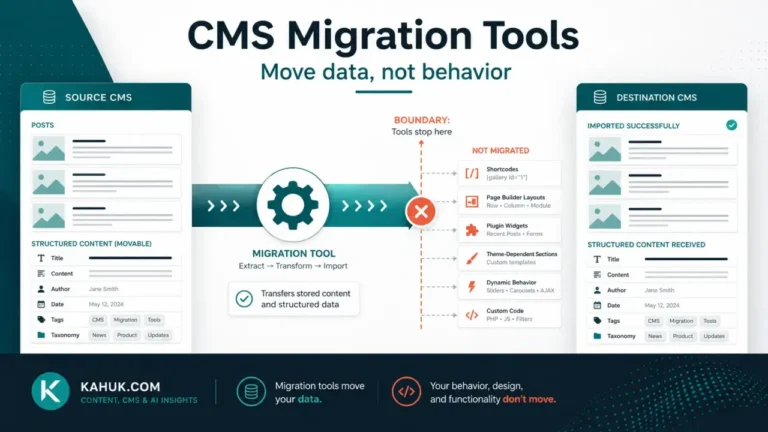
Comments, authors and publish dates are three separate pieces of data attached to a post, not one “metadata” item, and a CMS migration can carry any combination of them while dropping the others. Checking one tells you nothing about the state of the other two. Verify all three independently: whether each byline landed on a real account on the destination, whether the date shown is also the date the platform sorts by, and whether comments are still attached to the correct post rather than merely present somewhere in the archive.
The backup and rollback plan covers this the same way it covers content: verify it before you start, and keep the source platform available afterward, because comparing against it is how you catch a metadata failure that a glance at the migrated post would miss.
Why these are three separate problems
It is tempting to treat “metadata” as one thing that either survives a migration or does not. It does not work that way, because comments, authors and dates are stored as different kinds of records, joined to a post rather than contained inside it, and a migration path can carry each join with different reliability.
A post’s body text is usually the most robust part of a migration. Its author, its date and its comments are joins to other records, such as a user account, a timestamp field the platform uses for sorting, or a set of separate comment records, and each join can succeed or fail on its own. Treat each of the three as its own check.
Authors: what happens when the byline has no destination account
Author records generally import cleanly when the destination platform has a matching account to attach them to. The failure mode worth checking for is what happens when it does not: an author with no equivalent account on the new platform commonly has their posts reattributed, often silently, to whichever account ran the import.
If your site has multiple authors, or if any author no longer has an active account by the time you migrate, check this explicitly rather than assuming names traveled with the content. Open a sample of posts from each author and confirm the byline still reads correctly on the destination. This is a check you run post by post; a term or user list looking correct on the destination does not confirm every post is still attributed to the right name.
Dates: the date shown and the date the platform sorts by
A subtler failure sits underneath the displayed publish date. Some import processes preserve the date shown on the post while stamping the import moment as the date the platform actually uses to order content and build feeds. The visible date on the post can look correct while the archive, the RSS feed, or a chronological listing quietly reorders around the wrong timestamp.
This is worth checking directly rather than trusting the displayed date: look at where a migrated post sits in a chronological archive or feed relative to posts published before and after it, not just at the date printed on the post itself. If older content is appearing at the top of a feed or a recently-migrated post is sorting as though it were published today, the sort-order date and the displayed date have diverged.
Comments: their own dependency chain
Comments carry more attached data than a post does. Each comment has its own author record, which may or may not correspond to a real user on either platform, a timestamp, a reply structure if your site supports threading, and an association with the specific post it was left on.
That last piece is the one most likely to break. If post identifiers change during the migration, which is common when moving between platforms with different internal ID schemes, a comment can survive as a record while losing the connection that ties it to the right post. The comment still exists somewhere in the export or import data; it is simply no longer attached to anything a reader would find it under.
If you are migrating comments at all, this is worth verifying the same way as the images and shortcode content-fidelity checks elsewhere in this cluster: open a sample of posts that had comments on the source, and confirm the same comments, in the same order, are attached to the same post on the destination.
Verifying each of the three, by comparison
The same method applies to all three, and it is a comparison against the source, not an inspection of the destination alone:
For authors: pick a post from each author who published on your site, and confirm the byline matches on the destination.
For dates: compare the position of a handful of migrated posts in a chronological listing or feed against where they sat on the source, not just the printed date.
For comments: pick posts that had comment activity on the source, and confirm the same comments are attached to the same post on the destination, in the right order.
None of these three checks substitutes for the others. A migration that gets authors and dates right can still lose comment associations, and the reverse is equally possible.
Once these three are verified alongside the rest of the content-fidelity checks, the post-migration audit is where they fit into the fuller review after cutover. For where this step sits in the overall sequence, the migration guide sets out the order the whole cluster follows.
FAQ
Will my authors’ names stay on their posts after a migration?
Usually, if the destination platform has a matching account for each author. If an author has no equivalent account, their posts are commonly reattributed to whichever account performed the import, often without a clear notice that this happened.
Why does my migrated post’s date look right but it is sorting in the wrong place?
Some import processes preserve the date displayed on the post while using the import time as the value the platform actually sorts by. Check where a post lands in a chronological listing or feed, not just the printed date, to catch this.
Did my comments migrate if I can still see a comment count on the post?
Not necessarily. A comment count reflects records existing somewhere; it does not confirm each comment is still attached to the correct post. Check a sample by opening the post and reading the actual comments, not just the count.
Should I migrate comments at all?
That depends on how much value they carry for your specific archive, which is a decision only you can make. If you do, verify the post association explicitly, because it is the piece most likely to break silently.
What if an author no longer works with the site? Should I still preserve their byline?
That is an editorial decision, not a technical one. What this row covers is making sure the migration reflects whatever decision you make, rather than silently reassigning authorship as a side effect of the import.
Written August 2026. Author-matching, date-handling and comment-import behavior vary by platform and can change between releases; verify the specifics of your own source and destination platforms before relying on any detail above.