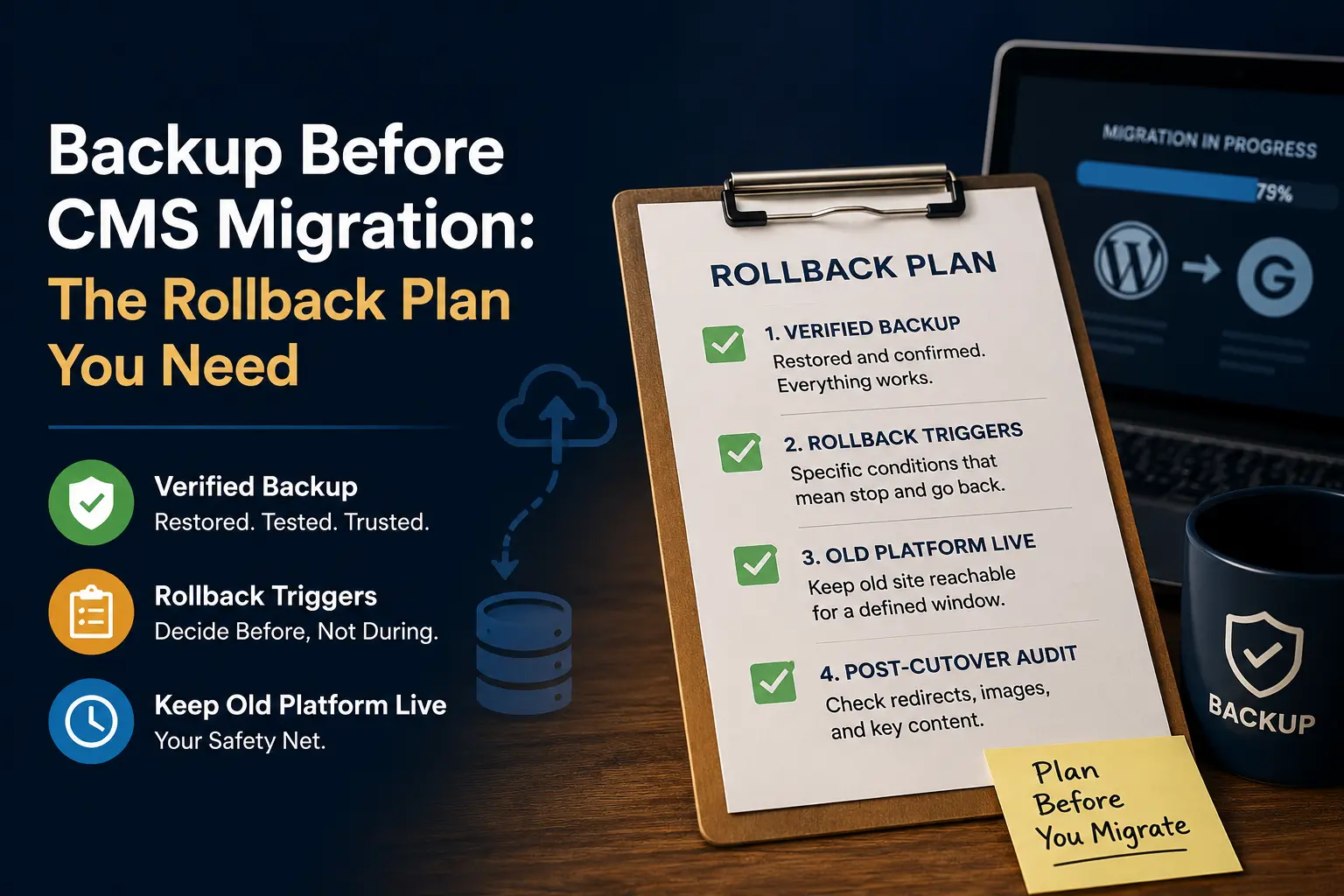
A backup-and-rollback plan for a CMS migration needs three things written down before you touch anything: a verified backup (one you have actually restored, not just exported), a list of rollback triggers decided in advance rather than during a crisis, and a way to keep your old platform reachable as a fallback until the new one is proven. Write these on one page before you start. Everything else in a migration is reversible if this page exists, and much harder to undo if it does not.
What “backed up” actually means
“I exported a backup” and “I have a backup that works” are not the same claim, and the gap between them is where most migration disasters live. A backup you have not restored is a hypothesis. The only backup that counts for migration purposes is one you have taken, restored somewhere separate from the live site, and confirmed looks and functions the way the original did.
For a content site specifically, that means checking more than “the file exists.” Confirm posts, pages, images, categories, tags and comments are all present in the restored copy, and spot-check a handful of posts for formatting that survived intact. If your platform supports both a full export and a database-level backup, take both. They fail differently, and having only one means a single failure mode can take out your only safety net.
Write your rollback triggers before migration day, not during one
The single biggest difference between a rollback plan that works and one that does not is timing: decide, in writing, what conditions would make you abort and roll back, before the migration starts. Trying to make that decision in the middle of a failing migration, with the site half-moved and stakeholders asking questions, produces worse decisions under worse pressure.
A workable trigger list for a small content site is short and specific:
- More than a defined percentage of posts fail to import cleanly (pick a number that matters to you, and write it down).
- Images fail to transfer above an acceptable rate.
- The new platform cannot be reached or is unstable past a set point in your migration window.
- A category of content you did not expect to break, breaks (this is why the audit step matters even mid-migration, not only after).
None of these need to be elaborate. They need to exist, in writing, before you start, so that when one of them happens you are executing a decision you already made calmly, not improvising one under pressure.
Keep your old platform reachable as the safety net
Do not decommission, cancel, or lock yourself out of your old platform the moment the new one goes live. The pattern that works: keep the old install or hosting account live and reachable, untouched, for a defined window after cutover, long enough to confirm the new platform is stable under real traffic and real editorial use, not just in a quiet first hour. Only after that window closes does the old platform get retired.
This is the part most guides for enterprise migrations frame around formal sign-off from IT and leadership. A solo operator or a two-person editorial team does not have that chain, but the underlying discipline still applies: somebody, even if it is only you, decides in advance how long the old platform stays live and what “stable enough to retire it” actually means, and writes that down too.
The one-page plan, as a template
| Section | What goes in it |
|---|---|
| Backup location and date | Where the verified, restored backup lives, and when it was last tested |
| Rollback triggers | The specific conditions that mean “stop and go back,” decided before migration day |
| Old platform retirement window | How long the old install stays live and reachable after cutover |
| Who decides | Even on a one-person team, write down that it is you, and when you check in with yourself |
| Post-cutover audit checklist | What gets spot-checked in the first hours: redirects, images, a sample of internal links |
This fits on one page deliberately. A rollback plan nobody reads under pressure is not a plan. If you cannot fit it on a page, you have written a policy document, not a plan you will actually use during a live migration.
Print it, or pin it somewhere you will actually look during the migration itself, not buried in a folder you will not open until something has already gone wrong. The value of this document is entirely in how quickly you can act on it mid-migration, and a plan you cannot find in the moment might as well not exist.
Why the backup step gets skipped, and why that is the actual risk
Nobody plans to skip the backup step. It gets skipped because a migration that is going smoothly does not feel like the kind of situation that needs one, and by the time it stops going smoothly, taking a fresh backup of a half-migrated site is no longer possible; you needed the one from before you started. This is the entire argument for treating the backup and rollback plan as the first task on the schedule, not a box to tick once you feel like the risky part is over. The risky part starts the moment you begin, not partway through.
Why this is a schedule item, not an insurance policy you hope to skip
The information most migration content leaves out: a rollback plan is not something you write and then hope never to open. It is a working document you refer to at defined checkpoints during the migration itself, not just in the worst case. Checking your triggers against reality at the 25%, 50% and 75% marks of a migration, not only at the very end, is what turns “I have a rollback plan” from a sentence into a practice. Every migration in this cluster that touches live content assumes this page exists first. The migration guide covers the full sequence this plan sits inside, and the list of things that break is worth reading immediately after this, because several of those failures are exactly what your triggers should be watching for.
Two migrations that lean on this plan directly are WordPress to Ghost and Ghost to WordPress, because both move content between platforms with meaningfully different content models, which is exactly where a tested rollback matters most.
FAQ
How often should I test my backup restore?
At minimum, once immediately before you rely on it for a migration. A backup you tested three months ago and have not touched since is not the same guarantee as one tested this week.
What counts as “verified” for a backup?
A restore you performed, not just an export file sitting in storage. If you have not restored it somewhere and looked at the result, it is unverified.
How long should I keep my old platform live after migrating?
Long enough to see real editorial and reader traffic on the new platform, not just a quiet first hour. There is no universal number; the point is deciding on one in advance rather than improvising it after cutover.
Do I need a separate rollback plan for every migration?
The template stays the same; the specific triggers and retirement window should be reconsidered for each migration, because archive size and content complexity change what “acceptable failure rate” means.
What if I discover a problem after my old platform is already gone?
This is exactly why the retirement window exists. If you have not confirmed the new platform is stable, do not decommission the old one yet, regardless of schedule pressure.