Moving from Ghost back to WordPress means exporting your content as a JSON file from Ghost’s own Settings menu, converting that file into a WordPress-compatible format because WordPress’s importer cannot read Ghost’s JSON directly, then importing the converted file through WordPress’s built-in importer. The step guides gloss over is the conversion itself, and the gap almost nobody mentions is that WordPress has no built-in equivalent to Ghost’s native SEO title and description fields, so you will need an SEO plugin in place before your metadata has anywhere to live.
If you moved to Ghost and are moving back, this is written without judgment about that decision. Nothing here reflects a migration performed for this site; every step is sourced to platform documentation and third-party migration guidance, dated 2026-07-29.
Exporting your Ghost content correctly
Ghost keeps its export function in Settings, under Labs or the equivalent import/export area depending on your version, and produces a single JSON file containing your posts, pages and their metadata. Before exporting, follow the backup and rollback plan this cluster assumes you have written: confirm you can actually open and read the exported file, not just that the export completed without an error.
Two things worth checking in the export before you move on: confirm the file includes everything you expect (post count matching your live site, images referenced correctly) and keep a dated copy of it somewhere outside either platform, independent of whether the rest of the migration succeeds.
The conversion problem nobody’s import wizard solves for you
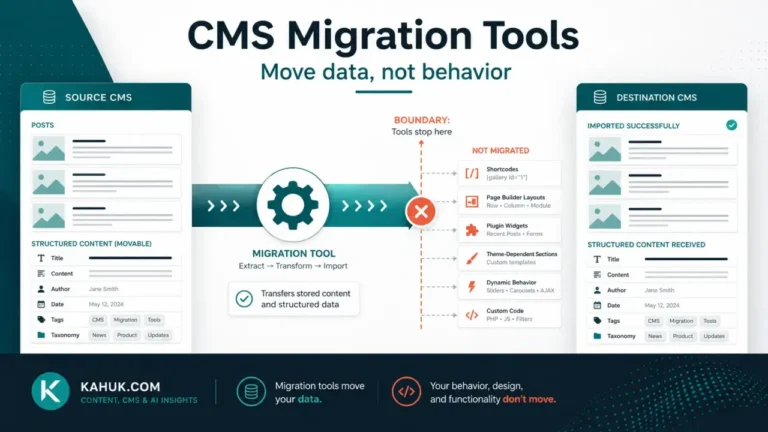
This is the step that trips people up, because it is easy to assume “export from A, import into B” is the whole job. It is not, for this specific pair of platforms. WordPress’s built-in importer expects a WordPress eXtended RSS (WXR) file, an XML format, and does not read Ghost’s JSON export natively. Getting from a Ghost JSON export to a WordPress-importable XML file requires a conversion step, either a third-party conversion tool built for this specific pair of platforms, or a custom script if you are comfortable writing one.
Whichever conversion path you choose, treat the output the same way you treated the original export: verify it, rather than assume it, before importing. A conversion tool that silently drops a field is a second, separate failure point layered on top of the migration itself, and it is worth spot-checking a handful of converted posts against their Ghost originals before you import the full archive.
Importing into WordPress, and what needs a manual pass afterward
Once you have a WordPress-compatible file, importing it uses WordPress’s own Tools → Import screen, installing the WordPress importer plugin if it is not already active, then running it against your converted file. After import, plan a manual review pass, the same categories of failure covered in the 12 things that break in every CMS migration apply here just as they do to any other CMS-to-CMS move: check that tags mapped the way you expected, that images resolved correctly, that comments (if you had any on Ghost) came across, and that nothing that depended on a Ghost-specific card or embed is showing as broken or blank content on the WordPress side.
If you are changing hosting as part of this move, not just platform, update your domain’s DNS settings once the new WordPress install is verified and stable, not before, so you retain a working fallback until you are confident the new setup works.
The SEO-field gap this migration opens
This is the detail that catches people moving in this specific direction, and it does not show up in most step-by-step guides because it is not a migration failure in the technical sense, it is a feature gap between the two platforms. Ghost has meta_title and meta_description as native, directly editable fields on every post. Plain WordPress, out of the box, does not have an equivalent field at all; SEO title and description control on WordPress is provided by a separate SEO plugin, not by WordPress core. If your Ghost posts carried custom meta titles and descriptions, that data does not have anywhere to land on a fresh WordPress install until you install and configure an SEO plugin and, in most cases, re-enter or re-verify that metadata post by post. Plan for this as its own task, not an afterthought discovered after your first post publishes with a generic auto-generated title tag.
Before starting this move, read the migration guide for the full sequence this fits inside. If you are moving in the opposite direction instead, WordPress to Ghost covers what changes when Ghost’s native SEO fields become available to you rather than something you have to add back.
Why this direction gets written about so much less
Part of why guidance for this specific move is thinner is simple market logic: far more sites move toward Ghost’s simpler editing experience than move away from it, so the tooling and the blog-post coverage both concentrate on that direction. That thinness is not a signal the reverse move is unsupported or unsafe, it is a signal that you will need to do more of your own verification, because fewer eyes have already found and documented the edge cases for this specific pair, in this direction, before you.
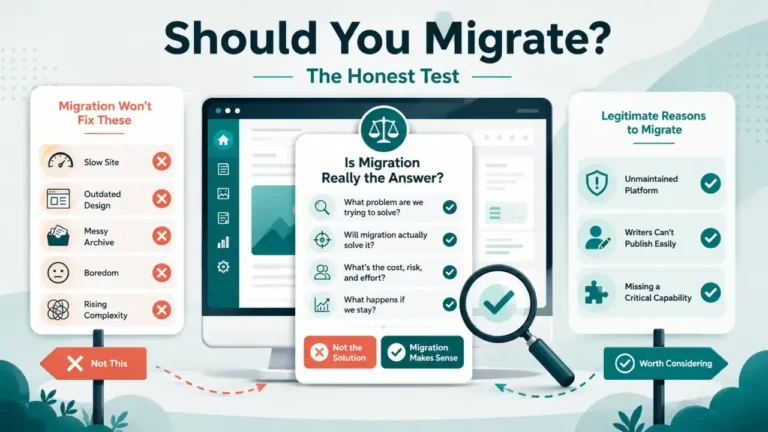
If your reason for moving back is a specific missing feature rather than general dissatisfaction, it is worth confirming that WordPress’s plugin ecosystem actually solves that specific gap before you commit to the migration, rather than assuming “WordPress can do more” automatically means it does the one thing you are moving back for.
FAQ
Can WordPress import a Ghost JSON export directly?
No. WordPress’s built-in importer expects an XML (WXR) file. A Ghost JSON export needs a conversion step, using a dedicated conversion tool or a custom script, before WordPress can import it.
Will my SEO metadata come across automatically?
No, and this is the gap most guides miss. Ghost has native meta title and description fields; plain WordPress has none until you install an SEO plugin, so that metadata needs a deliberate re-entry step, not an assumption it will just appear.
Do WordPress categories exist on a converted Ghost export?
Ghost’s own tag structure is what carries across; how it maps to WordPress categories versus tags depends on your conversion tool, so verify the mapping on a handful of converted posts before importing everything.
Is moving from Ghost to WordPress harder than the reverse?
The available guidance and tooling for this direction is noticeably thinner than for WordPress-to-Ghost, largely because it is a less common move. That does not make it technically harder, but it does mean fewer ready-made tools and more manual verification.
Should I keep my Ghost site running during this migration?
Yes, until your new WordPress install is fully verified, for the same reason any migration in this cluster keeps the old platform live as a fallback: an unverified new platform is not a safe reason to retire a working old one yet.
Written July 2026, based on Ghost’s own developer documentation and third-party migration guidance current on that date. Import tooling and default plugin behavior change over time; verify current specifics before relying on any detail above.