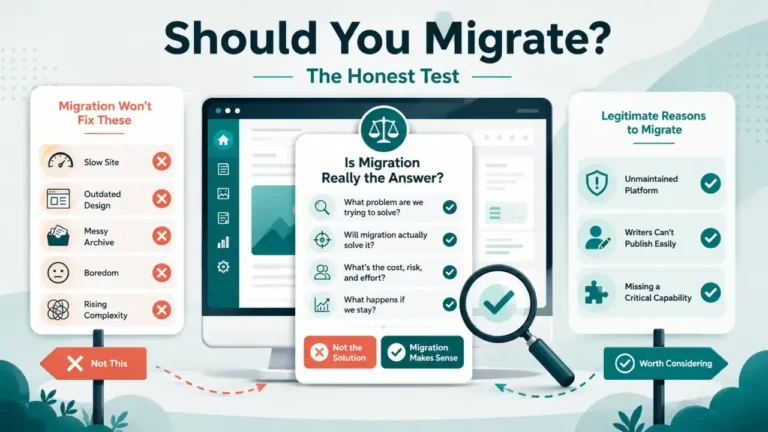
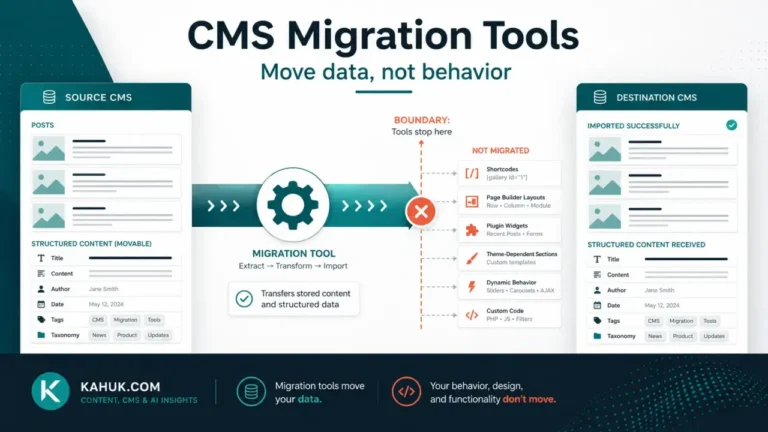
Moving from WordPress to Ghost transfers your posts, pages, tags and authors as content, and generally carries images along with it, but it does not automatically bring your SEO metadata, plugin-rendered content, custom fields, or your theme. WordPress categories collapse into Ghost’s flatter tag system, with your first category becoming the new primary tag. Budget time to rebuild anything that lived in a plugin, and check your scheduled posts by hand, because several migration paths mark them as drafts on import rather than keeping their publish date.
This is written as a cost-and-tradeoff account, not a case for switching. Nothing here reflects a migration performed for this site; every claim is sourced to platform documentation, dated 2026-07-29, and you should verify current behavior against Ghost’s own docs before you rely on it for your own move.
What transfers with little or no extra work
- Post and page content. The written body of your posts and pages is the least fragile part of the move, converting into Ghost’s JSON-based content format.
- Tags and authors. Ghost’s import process recognizes and preserves tags and author records from a WordPress export in most cases.
- Images. Images hosted on your WordPress install are generally carried across during import, though where they land in Ghost’s media library is worth spot-checking rather than assuming.
What does not transfer, and why
None of the following is a defect in either platform. They are differences in how two content models represent the same underlying idea.
- SEO metadata. Custom SEO title and description fields set by a plugin (the kind of field Yoast or a similar plugin manages on WordPress) generally do not transfer, because they are stored outside the core post content the export captures.
- Category structure. WordPress supports both categories and tags as separate concepts. Ghost has one flat tag space, and the import process typically treats a post’s first WordPress category as its new primary Ghost tag, with any remaining categories folded into ordinary tags.
- Plugin-rendered content. Comparison tables, custom galleries, and similar content built by a WordPress plugin generally do not render after migration, because the plugin that generated the markup is not part of the export.
- Custom fields, custom post types and shortcodes. Any content that lived in a custom field, a custom post type, or was inserted via shortcode is commonly not carried across and needs manual review post-migration.
- Forms. WordPress form-plugin submissions and configurations do not transfer to Ghost’s own membership and newsletter tools, which work differently.
- Your theme. Ghost themes are their own format, entirely separate from WordPress themes, so the visual design of your site is not something the migration carries with it.
The gap most guides miss: scheduled posts become drafts
One behavior that is easy to overlook reading a typical migration blog post: WordPress posts that are scheduled for future publication are commonly marked as drafts once imported into Ghost, rather than keeping their scheduled publish date and time. If you have a content calendar with posts queued weeks or months ahead, expect to review and manually reschedule each one after migrating, rather than assuming your queue survived intact. This is documented in Ghost’s own migration guidance (checked 2026-07-29) but is not consistently flagged in third-party migration blog posts, which is exactly the kind of quiet failure worth checking for explicitly rather than discovering when a reader notices your publishing calendar has gone silent.
What it actually costs you
The honest cost of this migration is not the export itself, which is largely mechanical, but the manual rebuilding afterward: re-adding SEO metadata post by post if you had it set through a plugin, recreating any plugin-rendered tables or galleries in Ghost’s native card-based editor, reviewing custom fields and shortcode content one at a time, and manually rescheduling your content queue. The size of that cost scales with how heavily your WordPress site relied on plugins rather than plain post content, and with how large your scheduled-post queue is at the moment you migrate. No fixed dollar or hour figure applies universally; a site with a hundred plain posts and no plugin-rendered content faces a different job than one with heavy custom-field use across thousands of posts.
Before starting, read the backup and rollback plan this cluster assumes exists first, and the 12 things that break in every CMS migration, which covers several of the failure modes above at a general level. The migration guide covers the full sequence this specific move sits inside. If you are considering the move in the other direction, the mirror of this article, Ghost to WordPress, covers what changes when you go the other way, including the SEO-field gap that appears because WordPress has no built-in equivalent to Ghost’s native meta fields.
Why “Ghost looks cleaner” is not the same question as “what do I give up”
It is easy to compare two platforms by their editing experience and stop there. Ghost’s writing interface is genuinely simpler than a heavily plugin-laden WordPress install, and that simplicity is real. But the comparison that actually matters before a migration is not “which editor do I prefer,” it is “which of my existing capabilities does the simpler platform not have a direct equivalent for.” A WordPress site built around a handful of plugins, an SEO plugin, a forms plugin, a table plugin, is really running several small applications stitched to one CMS. Moving to Ghost does not migrate those applications; it migrates the content that sat inside them, stripped of the functionality that displayed it. Knowing that distinction before you start is what separates an informed decision from a surprise three weeks after cutover.
FAQ
Will my SEO rankings survive a WordPress to Ghost migration?
Rankings depend far more on preserving your URL structure and redirecting anything that changes than on the platform itself. Metadata loss, not the migration in general, is the more common cause of ranking damage, so rebuilding it deliberately rather than assuming it carried over matters more than the platform choice.
Do WordPress categories become Ghost categories?
No. Ghost does not have a separate category concept; your first WordPress category typically becomes your post’s primary tag, and remaining categories fold into ordinary tags.
Will my scheduled posts still publish on schedule after migrating?
Not reliably. Several migration paths convert scheduled posts to drafts on import, so check your content queue manually after migrating rather than assuming it survived.
Do I need a developer to migrate from WordPress to Ghost?
Straightforward sites without heavy plugin use are often manageable without one. Sites with extensive custom fields, custom post types, or plugin-rendered content are where a developer’s help becomes worth the cost, because that content needs to be rebuilt, not imported.
Does my WordPress theme carry over to Ghost?
No. Ghost uses its own theme format entirely, so migrating content and migrating your site’s visual design are two separate projects.
Written July 2026, based on Ghost’s own current WordPress-migration documentation and third-party migration guidance, checked on that date. Import behavior can change between platform releases; verify current specifics before relying on any detail above for your own migration.