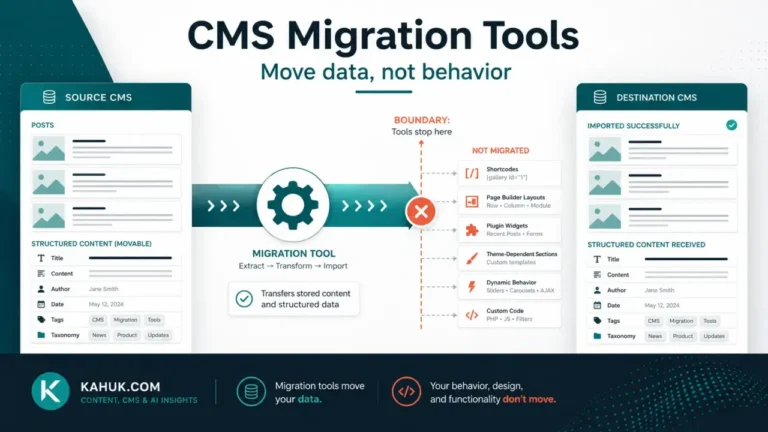
If your posts are full of square brackets after a CMS migration, your content is not damaged. What you are looking at is exactly what was always stored in those posts. On the old platform something read that bracket text as an instruction and replaced it with a gallery, a button, a table or a video before the page reached a reader. On the new platform nothing is reading it, so it appears as written. The instruction survived the move. The thing that used to carry it out did not, and it was never part of your content in the first place.
Before changing anything, make sure the backup and rollback plan is verified and restorable. The specific hazard here is that the brackets look like garbage, which makes bulk deletion tempting, and a bulk deletion across an archive is unrecoverable in a way the original problem is not. As long as the bracket text is still in your posts, you still know what each one was supposed to produce. Delete it and that information is gone with it. Keep the source platform running as well, because it is the only place you can see what any of them actually rendered as.
Your content is intact, which changes what to do next
It is worth being precise about the mechanism, because it determines the whole approach.
Content of this kind is stored as a short piece of text that stands in for something more complicated. The platform keeps the shorthand in the post and resolves it at the moment a page is drawn, by handing it to whatever piece of software knows what that particular shorthand means. That software is part of the platform, or part of something added to the platform, and it is never part of the post.
So the post is complete and correct. What is missing is an interpreter. That is a different problem from corrupted content, and it points somewhere different: you are not repairing text, you are deciding, for each kind of shorthand, what should exist in its place on the new platform.
This is also the clearest example in a migration of what platform lock-in actually looks like in practice. Not a vendor refusing to let you export, but content that exports perfectly and only means something inside the system that produced it.
Shortcodes are one form of this. There are several
Fixating on the brackets is the common mistake, because they are the visible form. The general category is content that needs an interpreter, and it takes at least four shapes in a typical archive:
Bracket-style codes. The familiar form, and the loudest failure, because the raw text shows up on the page where anyone can see it.
Block markup. Content stored in a structured format with its own syntax, often wrapped in markers the platform reads and readers never see. When the destination does not understand it, results vary: sometimes the text inside survives and the structure is lost, sometimes the markers themselves become visible, and sometimes the whole thing is discarded.
Platform-specific cards and components. Purpose-built content types such as callouts, toggles, product boxes or embedded forms. These usually do not have a bracket form at all, so nothing appears on the page to indicate one was ever there.
Embed shorthand. A bare address on its own line that the old platform turned into an embedded player or card. On the destination it may become a plain link, an unformatted address, or nothing.
The reason this list matters more than the brackets: if you treat the symptom as a bracket problem you will search for brackets, fix what you find, and conclude you are finished, while three other categories sit unexamined in the same archive.
The silent version, and why it is the worse one
A visible failure is the good outcome. Bracket text on a live page is loud, someone reports it, and it gets fixed.
The dangerous version is the one that leaves nothing behind. If the destination stripped markup it did not recognize during import, the page now has a gap where a gallery, a comparison table, a form or a call to action used to be, and there is nothing on the page to indicate anything is missing. The paragraph before it reads normally and the paragraph after it reads normally. Only someone who remembers what that post used to contain would notice, and for an archive of any size nobody does.
Two things find this, and both need doing deliberately:
Compare a sample side by side. Open the same post on the source platform and the destination, next to each other, and read both. Not skim. Pick posts that you know were complicated: the ones with tables, galleries, downloads, comparison boxes or forms. Ten posts read properly will tell you more than a hundred glanced at.
Search the source, not the destination, for what to look for. The destination no longer contains the markup, so searching it finds nothing. The source still has every instance, which means the source is where you build your list of what should exist. This is the only reliable way to find the silent cases, and it is another reason not to retire the old platform early.
The same logic applies across the whole content-fidelity problem: what happens to your images and what happens to your internal links both fail in a visible way and a silent way, and in every instance the silent one is found by comparison against the source rather than by inspection of the destination.
Inventory before repair
The reason this job feels unbounded is that nobody counts it first. It is finite and countable, and counting takes far less time than fixing.
Search the source platform’s content for each form. Bracket codes are searchable as text. Block markers are searchable as text. Embed shorthand is findable by looking for bare addresses on their own lines. Platform-specific components usually have some listing or usage view, and if not, they can be found by reading a sample of posts by hand.
Count the distinct kinds, not the instances. This is the number that matters. An archive with four hundred instances of six distinct kinds is a small job. An archive with sixty instances of forty distinct kinds is a large one. The instances are usually repetitive; the kinds are what require a decision each.
Note which kinds appear in which posts. You need this to check your work afterward, and building it later means searching an archive that no longer contains the thing you are searching for.
Sort by where they appear. A kind used in your five most-read posts is a different priority from one used once in 2019. Both need a decision; they do not need the same urgency.
Older content is where the awkward cases concentrate, for the same reason described in the 12 things that break in every CMS migration: the shorthand available five years ago is often the shorthand nothing supports now, including on the platform you are leaving.
The four things you can do with each one
Every distinct kind on your inventory gets exactly one of these, and the decision is per kind rather than per site:
Reproduce it. The destination has an equivalent, and the content can be rebuilt using it. Best for anything structural and frequent, such as tables or galleries. This is the most work per kind and usually the right answer for the few kinds that carry most of the instances.
Convert it to plain content. Replace the shorthand with what it produced, written as ordinary content. A button becomes a link. A callout becomes a paragraph with a heading. You lose the styling and gain content that will never break again on any future platform, which for anything you expect to keep for years is often the better trade.
Drop it. Some of it was decoration, some of it referred to something that no longer exists, and some of it was from a plugin nobody has thought about in years. Removing it is a legitimate outcome and usually applies to more kinds than people expect.
Leave it and accept the gap. Reasonable only for content you have already decided is not worth the effort, and only if you have recorded the decision. An undocumented “leave it” is indistinguishable from having missed it, and a year later nobody can tell which it was.
Whichever you choose, work through the inventory kind by kind rather than post by post. Post by post means encountering the same decision repeatedly and answering it inconsistently. Kind by kind means deciding once and applying it everywhere, and it is also the only order in which you can tell how far through you are. For where this fits in the overall sequence, the migration guide sets out the order the whole cluster follows.
FAQ
Are my posts corrupted?
No. The bracket text is exactly what was always stored in those posts. The old platform replaced it with something before the page was drawn, and the new one does not. Your content is complete; its interpreter is missing.
Can I just delete all the brackets?
You can, but do not do it before taking an inventory. While the shorthand is still there you know what each one was meant to produce. Once deleted, that record is gone and the only way to recover it is from a backup or the source platform.
Some things are missing entirely with no brackets left behind. What happened?
The destination stripped markup it did not recognize during import. This is the silent version of the same failure, and it is found by comparing posts against the source platform rather than by inspecting the destination.
Do I have to fix every one of these?
No. Each distinct kind gets one of four decisions: reproduce, convert to plain content, drop, or knowingly leave. Dropping is a legitimate outcome for decoration and for anything referring to something that no longer exists. What matters is that the decision was made rather than missed.
How do I stop this happening in the next migration?
Prefer plain content over platform-specific shorthand for anything you expect to keep for years. Shorthand is a convenience provided by one platform, and content written in it belongs to that platform in a way plain content never does.
Written July 2026. Platform import behavior and markup handling change over time; verify the specifics of your own source and destination platforms before relying on any detail above.