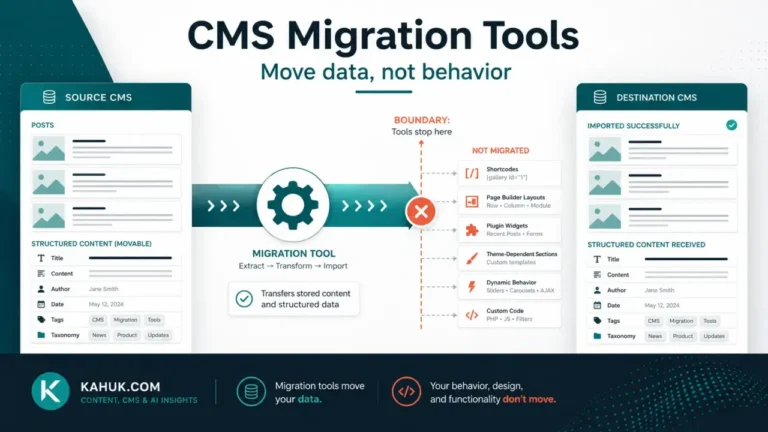
Run a structured check of content fidelity, links and structure, and peripheral systems, in that order, before treating a migration as finished. This is a content-and-structure audit, not a search-performance review. Checking whether your migration ranks, indexes or performs the same as before is a separate discipline with a separate owner. What follows is the check that confirms what actually moved, and what did not, regardless of how it performs afterward.
Keep the backup and rollback plan intact through this entire window: the source platform stays reachable and unchanged, because it is what you compare against when something looks wrong, and it is still your way back if the audit turns up something serious.
Why “it looks fine” is not the standard
A homepage that loads correctly and a handful of recent posts that read normally tell you almost nothing about the state of your full archive. The failures that matter most in a migration are quiet ones: flattened taxonomy that leaves a term list looking complete while content underneath it is unclassified, a comment thread detached from its post, a byline reassigned without notice, an internal link pointing at a structure that no longer exists. None of these shows up in a glance at the site. Each needs a deliberate check.
Treat cutover as the start of the audit, not the end of the migration. A migration is not done when the domain switches. It is done when the audit below passes.
The checklist, in order
Check in this sequence, because each stage depends on the one before it being solid.
1. Content fidelity. Is anything missing or wrong in the content itself? This is the 12 things that break checklist, run as verification rather than anticipation: images present and correctly placed, formatting intact, taxonomy assignments correct, comments and authors attached where they should be, dates accurate. Do this first, because a fidelity problem underneath everything else will make the later checks harder to interpret.
2. Links and structure. Once content is confirmed intact, check that internal links still resolve rather than pointing at a structure that existed on the old platform. Broken internal links are a structural problem layered on top of otherwise-correct content, and checking for them before fidelity is confirmed means you cannot tell whether a bad link is a link problem or a symptom of missing content.
3. Peripheral systems. Search on the site, any subscription or notification feature, contact or comment forms, and anything else that depends on the platform working correctly end to end. These are the last check because they depend on content and structure being right first: a broken search feature pointing at content that migrated incorrectly is not a search problem, it is a symptom of stage 1.
What to check in the first hours versus the next few days
Not everything needs checking at the same pace. In the first few hours, look for anything loud: error pages, obviously broken layouts, content that fails to load at all. These are the failures a reader notices immediately and reports quickly.
Over the following days, run the deliberate, comparison-based checks that a glance cannot catch: the sample-based content-fidelity reads, the link check, the metadata verification. These take longer because they require comparing against the source rather than just looking at the result, and they are exactly the checks a rushed first-day review skips.
Keep the source platform available through both phases. Some of what you are checking for is only findable by comparison, and the comparison only works while the source still exists in its pre-migration state.
When something is wrong: fixable gap or reconsider
Most of what an audit finds is a fixable gap: a category that needs remapping, a handful of posts with a formatting issue, a batch of broken internal links that need repair. Fix these directly, using the same comparison-against-source method that found them.
Occasionally an audit finds something more fundamental: a whole content type that does not survive the migration path at all, or a volume of problems that suggests the migration process itself, not individual posts, is the issue. That is a different decision than fixing a handful of posts, and it is worth stopping to make it deliberately rather than patching symptoms one at a time. The cutover sequence this audit follows is built around keeping the source available specifically so this decision remains possible.
Signing off: when a migration is actually finished
A migration is finished when the checklist above has been run in full, not when the domain has been pointing at the new platform for a while without complaints. Silence is not the same as correctness: several of the failures this checklist catches produce no visible symptom until someone happens to look for the specific thing that broke. Running the audit deliberately, once, in order, is what closes a migration out rather than leaving it in a state where problems surface for months. For where this audit fits in the overall sequence, the migration guide sets out the order the whole cluster follows.
FAQ
How is this different from the “12 things that break” checklist?
That earlier checklist is read before a migration, as an anticipation of what might go wrong. This one is read after cutover, as verification of what actually happened. Same failure modes, different moment.
Does this audit check my search rankings or indexing?
No. This is a content-and-structure check confirming what migrated correctly. Search performance and indexing are a separate discipline with a separate owner, and nothing here should be read as ranking or indexing guidance.
How long should I keep checking after a migration?
The loud failures usually surface within hours. The quiet ones, such as metadata, taxonomy, or silently dropped content, take longer to find because they require deliberate comparison against the source, which is why this audit is a days-long process, not a same-day one.
What if the audit finds a lot of problems, not just a few?
That is worth treating as a signal about the migration process itself rather than fixing each problem in isolation. A high volume of similar failures usually points to one root cause worth diagnosing before you keep patching individual posts.
When can I stop keeping the old platform available?
Once the audit above has been run in full and passed, and enough time has passed that you are confident nothing further will surface. There is no fixed number that fits every site; the point is not to decommission the source before the audit is actually complete.
Written August 2026. Migration verification steps described here are general practice and can vary by platform; verify the specifics of your own source and destination platforms before relying on any detail above.