If a CMS migration has failed halfway, stop the import and change nothing else. Do not re-run the importer, do not start deleting the partial content, and do not switch your domain over to the new site. A partially migrated database is not safely re-runnable: running the same import again on top of it usually duplicates everything it already moved instead of finishing the job. The thing you roll back is the destination, not the source. Restore the destination to a known clean state, leave the old site running, and try again from there.
Before you touch anything, take a backup of the broken state and verify you can restore it. That sounds strange when the broken state is the problem, but it is the rule. Back up the destination, back up the source, and then actually test one restore into a scratch environment before you rely on either. A backup you have not restored is a claim, not a backup. This article never asks you to delete anything until you have a tested restore of that thing sitting somewhere else, and if that ordering feels slow while a migration is on fire, it is the part that gets skipped and the part people regret.
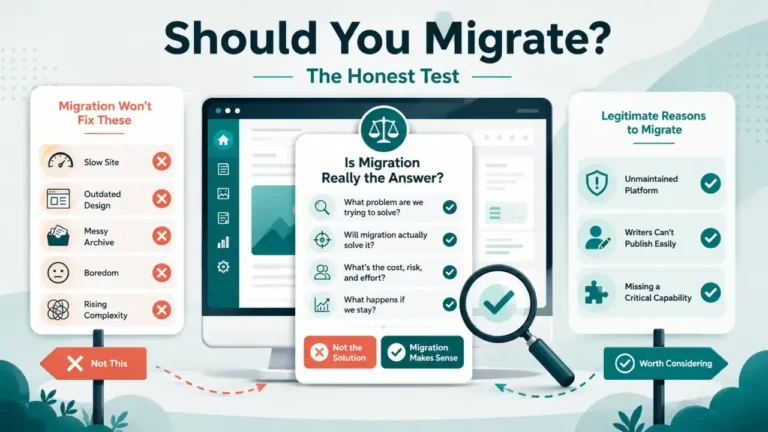
This article is the abort procedure, read during a failure. It is deliberately separate from two neighbors: the 12 things that break in every CMS migration is the anticipatory list you read before you start, and the post-migration audit is the verification pass you run after a cutover that appears to have worked. This one is for the moment when it did not.
Step one: stop the import, do not fix it
The instinct when an import stalls or throws errors is to adjust a setting and run it again. Resist that until you know what state the destination is in.
Halt the running job. Close the importer. If content is being pushed by a script or a scheduled task, stop the schedule as well, because a retry loop that fires again in ten minutes will keep writing into a database you are trying to reason about. Nothing else changes until you have answered the triage question below.
The source platform stays exactly as it is: live, reachable and untouched. If your plan involved putting the old site into read-only mode, read-only is fine. Offline is not, and deleted is a category error. The source is the only complete copy of your archive that you know is correct, and it is also the only thing you can compare the destination against when you are trying to work out what actually landed.
Which failure are you actually in?
Rollback difficulty is set almost entirely by how far the cutover got, not by how alarming the error message looks. Find your row before you do anything.
| State you are in | Is the source intact? | What rollback costs |
|---|---|---|
| Import failed, DNS still points at the old site | Yes | Almost nothing. Readers never saw it. Clear the destination and retry |
| Import finished but content is visibly wrong, DNS still on old site | Yes | Low. You have unlimited time to diagnose, because nothing is public |
| DNS switched, new site live, problems found after | Yes, if you kept it | Moderate. Point back to the old site, then fix offline |
| DNS switched, and the source was already decommissioned or wiped | No | Severe. You are now recovering from backups, not rolling back |
| Migration was run directly on the live database rather than a copy | No | Severe. Restore from backup is the only path, and this is why nobody should do this |
The first two rows are the overwhelming majority of failed migrations, and in both of them you have not actually lost anything. The panic is usually out of proportion to the state. The bottom two rows are the reason the previous section insists the source stays alive.
Why a half-finished import cannot simply be re-run
This is the part that catches people, and it is missing from most of what gets written about migration rollback, because most of that material is written about enterprise database and CRM migrations where every write is wrapped in a transaction that unwinds cleanly on failure.
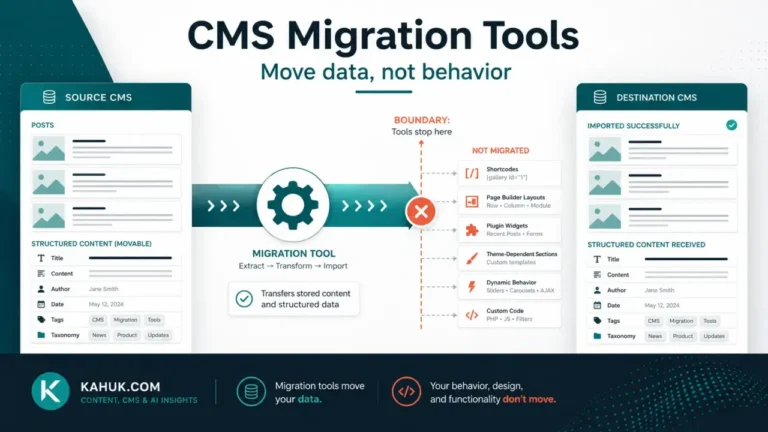
Content imports usually are not. A typical CMS importer works through your archive item by item, committing each one as it goes. When it dies at post 240 of 900, those 240 posts are already saved, with new IDs, in the destination. The importer has no memory of that. Point it at the same export file again and, unless it has explicit duplicate detection that actually works on your data, it will import all 900, and you will end up with 240 pairs.
Even where duplicate detection exists, it usually matches on a field like slug or title. That silently mishandles the exact content you care about: two posts legitimately sharing a title, posts whose slug got rewritten during the first pass, attachments that were partially copied, and taxonomy terms created on the first run that get created again with a numeric suffix on the second. You then have a destination that looks populated and is quietly wrong, which is worse than one that is obviously empty.
So the correct unit of rollback for a content migration is the whole destination, not the failed batch. Reset the destination to a clean, known state and run the import once, from the beginning, against a source you have not modified in the meantime.
The abort procedure, in order
- Stop the import and any retry schedule. Nothing else until this is true.
- Confirm the source is intact and reachable. Load a few real posts on the old site. Check that its own backup from before the migration still exists and still restores.
- Back up the destination as it currently stands, and test that restore. Yes, even though it is broken. If your diagnosis later turns out to be wrong, this is the only copy of the evidence.
- Point the domain back at the source, if it had been switched. Do this before any cleanup work. Reversing the DNS change costs nothing and takes the public consequences off the table while you work.
- Only now, with a tested restore of the destination in hand, reset the destination to its clean pre-import state. Restore the empty or baseline snapshot you took before the first import attempt. If no such snapshot exists, a fresh install of the destination platform is safer than trying to hand-delete partial content, because hand-deleting reliably leaves orphaned media, terms and users behind.
- Work out what failed, on a copy. Timeouts, memory limits, file size caps, a malformed export, an encoding problem in a handful of posts.
- Rehearse the fix on a small sample before running the full import again. Running a test migration on 20 posts is cheap and it is how you find out whether the fix is real.
Note what is not in that list: deleting the source, overwriting the live database, or dropping tables in the destination while it is the only copy of anything. Any step that destroys data appears only after the restore path for that data has been tested and named.
Deciding to abort, before you need to
The hardest part of a rollback is not the mechanics. It is admitting that the migration is not going to finish today, and teams tend to burn hours pushing forward because stopping feels like failure. Every hour of that makes the reversal harder, particularly if the new site is already public and accumulating comments, subscribers or edits that exist nowhere else.
The fix is to write the abort conditions down before migration day, when nobody is stressed. Something as plain as: if the site is not verified and signed off within four hours of the cutover, we revert to the old platform and reschedule. If more than a stated share of posts fail to import, we stop and fix the export rather than patching by hand. If we cannot describe the problem and the path out of it in two sentences, we roll back.
Give someone the authority to make that call, and make the reversion path part of the plan rather than an admission of defeat. The cutover sequence is easier to reverse the earlier you are in it, and the whole reason to keep both systems running through the window is so that reversing stays cheap.
What removes your way back
Four things account for most migrations that cannot be rolled back at all:
- Decommissioning the source too early. Hosting on the old platform is trivially cheap compared to reconstructing an archive. Keep it for weeks after cutover, not hours.
- Running the import against the live production database instead of a copy. There is no undo here that is not a full restore.
- Never testing the backup. Untested backups fail exactly when they are needed, and the failure is often a permissions or size problem that would have taken ten minutes to find in advance.
- Letting the new site accumulate unique data before sign-off. New comments, new subscriber signups and edits made on the new platform do not exist on the old one. Every hour the unverified site is public, reverting costs more.
All four are addressed in advance rather than during a crisis, which is what the backup and rollback plan is for, and why this cluster treats it as the one step that is never optional.
After you have stopped
A halted migration is not a failed project. It is a rehearsal that produced information: you now know which part of your archive breaks the importer, and that is usually a small, specific and fixable thing.
Write down what state everything was left in, where each backup lives, and what the next attempt will do differently. Then start again from the pillar, the CMS migration guide, rather than from the middle of a broken run. Restarting from a clean destination with a known-good export is nearly always faster than repairing a half-migrated one, and it is the only version of this that ends with a site you can trust.
FAQ
Can I just re-run the migration importer after it fails?
Usually not safely. Most content importers commit each item as they go, so the items already imported stay behind. Re-running commonly produces duplicates rather than completing the job. Reset the destination to a clean state and import once from the beginning.
Should I delete the partially imported content by hand?
Only as a last resort. Hand-deleting posts tends to leave orphaned media files, taxonomy terms and user accounts, so the destination looks clean and is not. Restoring a pre-import snapshot, or reinstalling the destination platform, gives you a state you can actually trust.
How long should I keep the old CMS running after a migration?
Weeks rather than hours, and certainly until the post-migration audit has been signed off. The old platform is your only complete reference copy and your only cheap way back, and the hosting cost is small next to what it protects.
What if the domain has already been switched to the broken site?
Point it back to the source first, before any cleanup. That reversal is quick and it removes the public consequences while you diagnose. Then work on the destination with no clock running.
Is a failed migration a sign we chose the wrong platform?
Not by itself. Most failures are mechanical: a timeout, a file size limit, an encoding problem, an export missing a field. Whether the destination platform was the right choice is a separate question, and one worth asking before the next attempt rather than during this one.
Written July 2026. Importer behavior varies by platform and version, so confirm how your specific import tool handles a resumed or repeated run against its own documentation before relying on it.