A pull request makes perfect sense to a developer. You make a change on a branch, review the diff, run automated checks, get approval, and merge it into production.
For a content editor, that same process can sound unnecessarily technical. Writers are more accustomed to drafts, review statuses, preview links, approvals, schedules, and a Publish button—not branches, commits, and merges.
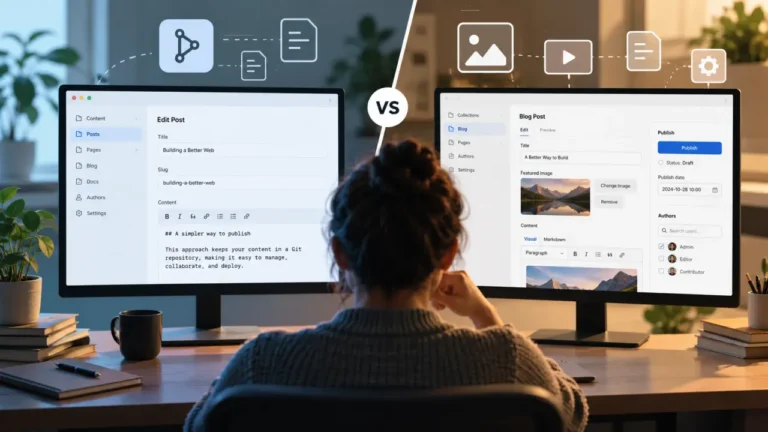
TinaCMS sits directly in the middle of those two models. It gives editors a visual CMS while storing content in Git, and its Editorial Workflow can turn a content change into a branch and draft pull request instead of writing directly to the production branch. Tina handles much of the Git machinery behind the interface, but the final publishing workflow still has Git underneath it.
That raises a more useful question than whether TinaCMS is “easy to use”: can a pull-request workflow actually work as an editorial workflow for a real content team?
The answer is yes—but only for the right kind of team. TinaCMS is particularly compelling when Git is already an organizational strength. It is less convincing when a team expects the CMS itself to function as a complete editorial operations system.
How TinaCMS Editorial Workflow Actually Works
To understand the tradeoff, it helps to separate TinaCMS from the experience of editing Markdown directly in GitHub. Editors do not normally need to open a repository, create a branch manually, edit a file, write a commit message, and construct a pull request themselves.
Instead, an administrator can enable Editorial Workflow in TinaCloud and designate branches such as main as protected. When an editor tries to save a content change while working from a protected branch, Tina prompts them to create a working branch. Tina creates and indexes that branch, saves the content there, and generates a draft pull request. Subsequent edits can continue on the working branch.
This changes the meaning of “Save.” The editor is no longer necessarily changing production content. They are building a proposed version of the site that can be reviewed before it becomes live.
Tina also supports configurable preview URLs. A team using a deployment platform such as Vercel can, for example, connect the current branch to a preview deployment. That gives reviewers the rendered page rather than forcing them to judge the change from CMS fields or a Git diff.
Publishing is where the Git model becomes more visible. TinaCMS’s current documentation says that when content is ready, the draft pull request is merged into the protected branch through GitHub. After the merge, the updated content is available on that branch and can move through the site’s normal deployment process.
So the practical flow is:
Edit in Tina → create a working branch → Tina opens a draft pull request → preview and review → merge the pull request → deploy.
TinaCMS Hides Git, but It Does Not Remove Git
This distinction matters.
A Git-backed CMS does not necessarily require editors to become Git users. Tina’s visual editing layer can shield writers from source files, command-line tools, commit commands, and most repository mechanics. Branch creation is surfaced in the CMS, and Tina now provides direct access to the pull request once the workflow has completed.
But some Git concepts remain part of the mental model. An editor may still need to understand why their change is on one branch rather than another, why a saved page is not yet live, what a pull request represents, and who has responsibility for merging it.
That is not automatically a weakness. Every CMS exposes some kind of publishing model. WordPress has drafts and revisions. Enterprise platforms may expose workflow states, approval stages, and publishing queues. Tina exposes a model that maps much more closely to software delivery.
The important question is whether that model matches the organization using it.
Where Pull Requests Can Be Better Than a Publish Button
The strongest argument for TinaCMS’s approach is not that Git is fashionable. It is that a pull request can provide controls that a simple CMS draft-and-publish workflow often lacks.
Content Changes Become Reviewable Units
A branch can contain a coherent piece of editorial work: a new landing page, a documentation update, a product launch, or a group of related changes. Instead of reviewing isolated field changes, a team can evaluate the proposed update as a unit before merging it.
This is especially useful when a content change touches several files or components. The article, metadata, navigation entry, image, and supporting configuration can all be considered part of the same release rather than independent CMS edits.
The Preview Can Become the Approval Artifact
For many stakeholders, a Git diff is the wrong review interface. A rendered preview is much better.
A product manager does not necessarily care which Markdown lines changed. They care whether the headline fits, whether the screenshot is correct, whether the call to action works, and whether the page looks right on the actual site.
A branch-based preview lets a team preserve Git’s change-control model while giving non-technical reviewers something much closer to the finished page.
CI Can Become Editorial Quality Control
This is where a Git-based CMS becomes more interesting than a conventional Publish button.
A pull request can trigger automated checks before the content reaches production. Depending on the site’s engineering setup, that could include broken-link detection, build validation, schema checks, required metadata, accessibility tests, formatting rules, structured-data validation, or custom editorial policies.
TinaCMS has even documented an experimental content-auditing workflow using TinaCloud, GitHub Actions, and GitHub Models. The example scans content for potential improvements, creates GitHub issues, and uses a pull request as part of the audit process. Tina describes the guide as a work in progress, so it should not be confused with a polished native AI editorial feature, but it demonstrates an important architectural advantage: once content participates in Git workflows, automated and AI-assisted review can participate too.
That is a more consequential use of AI than adding another “write this paragraph for me” button to a CMS. AI can become a quality-control layer around proposed changes.
A Pull Request Is Not Automatically an Editorial Workflow
This is the most important limitation to understand.
Git is excellent at answering questions such as: What changed? Who changed it? Has this version been reviewed? Did the automated checks pass? What exactly are we about to merge?
An editorial operations system needs to answer additional questions: Who owns this article? Is it waiting for copy editing, legal review, SEO review, or executive approval? What is due this week? Which posts are scheduled for next Tuesday? Which drafts have been stalled for a month? Which freelancer needs feedback?
A pull request can participate in those processes, but the pull request itself does not automatically provide them.
This distinction may barely matter to a three-person documentation team. It can matter enormously to a publication coordinating writers, editors, legal reviewers, designers, SEO specialists, and a calendar of dozens of articles.
The Publishing Handoff Is the Biggest Friction Point
Tina reduces the need for editors to work directly in GitHub during content creation, but the current documented publishing step still ends with a GitHub pull-request merge.
That arrangement can work very well if a content lead, developer, or technical editor already owns releases. The writer works in Tina. A reviewer inspects the preview. Automated checks run. The appropriate person merges the PR.
It becomes less elegant when the goal is for a non-technical marketing team to control the entire publishing process without leaving the CMS.
Interestingly, TinaCMS appears to recognize this boundary. In its May 2026 discussion of TinaCMS v4, the team listed Editorial Workflow as an area it wants to improve, specifically describing a goal of bringing branch and pull-request workflows further into the editor so content teams do not need to live in GitHub. That is a roadmap direction rather than a feature buyers should assume exists today, but it is also useful evidence of where the current workflow still has room to improve.
Git Workflow Reliability Is a Real UX Problem
There is another reason not to dismiss editorial usability as simple training.
In December 2025, TinaCMS published an account of reliability improvements to its Editorial Workflow. The previous experience could be interrupted while Tina was creating and indexing a branch and opening the pull request. Users who navigated away during that process could end up without the expected PR.
Tina changed the workflow by adding suggested branch names, clearer progress feedback, a locked workflow state during processing, and direct access to the resulting pull request. The company says the process now continues even if the browser tab is closed.
Those improvements are useful, but the history is also instructive. Translating asynchronous Git operations into a CMS experience is a genuine product-design challenge. An editor expects “Save” to feel immediate and predictable. Branch creation, indexing, remote repository operations, pull-request creation, and deployment infrastructure introduce more moving parts.
That does not make Git-based publishing bad. It means teams should test the complete workflow instead of evaluating Tina only by how pleasant the editing interface looks.
What Happens When Five Editors Create Ten Branches?
The single-editor demo is the easy case.
The more revealing test is a Monday morning with several writers working simultaneously. One person is updating pricing copy. Another is rewriting the homepage. Two writers are changing documentation. A product launch has its own content branch. Yesterday’s abandoned campaign is still sitting in the branch list.
At that point, branch management becomes editorial management.
Teams need conventions for branch naming, ownership, cleanup, reviewer assignment, and deciding whether one branch represents one article, one campaign, or several related changes. They also need a policy for conflicting edits when two branches change the same content.
Developers already have cultural conventions around these problems. Content teams may not.
This is one reason TinaCMS is easier to recommend to organizations where editorial and engineering already collaborate closely. The technology is only half of the workflow. The other half is the operating model built around it.
Media Makes the Git Model More Complete
One detail in TinaCMS’s implementation deserves more attention than it usually gets: repo-based media can participate in Editorial Workflow too.
When Editorial Workflow is enabled, media can be branch-aware. Tina’s current documentation says an image uploaded or deleted while editing a protected branch can be routed through a working branch and pull request rather than immediately modifying the protected branch. The media change then reaches the protected branch when the PR is merged.
That matters because content approval is not only about text. Replacing a product screenshot, deleting an asset, or changing a hero image can be just as consequential as rewriting a paragraph.
A workflow that reviews copy but lets related media bypass the same control would be incomplete. Tina’s branch-aware media model makes the underlying Git approach considerably more coherent.
Separate Content Repositories Make More Sense for Larger Teams
TinaCMS added another interesting option in 2026: a TinaCloud project can use one repository for the site generator and application code and a separate repository for content.
In that setup, Tina loads its schema from the generator repository while editorial branches, pull requests, content changes, and media can live in the content repository. Tina specifically highlights cleaner commit history, tighter permissions, and reuse of a content repository across multiple sites as reasons to separate the two.
This can remove one psychological and operational objection to Git-based editing: content editors no longer need to be working against the same repository that contains application code.
For a growing organization, that separation may be healthier. Engineers can manage application releases in one repository while editors generate a much higher volume of content commits in another.
The tradeoff is architectural complexity. Two repositories are still two repositories. Someone needs to understand the integration, CI setup, permissions, builds, and failure modes even if the editor never sees them.
Permissions Are Not the Same as Editorial Roles
TinaCloud’s collaborator documentation currently describes project-level Editor and Admin roles. Both can edit content, while Admins can additionally manage project configuration and collaborators.
For a small team, that may be sufficient. For a more complex publication, “Editor” can be too broad a concept.
A mature editorial operation may distinguish between a writer, copy editor, SEO reviewer, legal reviewer, translator, publisher, and administrator. Some of that governance can move into GitHub through repository permissions, required reviewers, branch-protection rules, and CODEOWNERS-style processes, but then the workflow spans two systems rather than living entirely inside the CMS.
Tina’s pricing page also indicates that its role model is evolving, including additional role capability on higher plans, so teams with strict permission requirements should validate the exact behavior available to their plan rather than assuming a conventional newsroom-style permissions hierarchy.
The Best TinaCMS Workflow May Be Deliberately Hybrid
The most convincing TinaCMS setup may not be one where every participant uses the same tool.
The writer works in Tina. They edit visually, create the content branch, and continue revising without manually manipulating repository files.
The stakeholder reviews a preview. A product owner, client, or executive can evaluate the actual page rather than learning GitHub.
The technical content lead reviews the PR. They can inspect changes, confirm checks, and coordinate with engineering when necessary.
The developer owns the infrastructure. They configure schemas, preview deployments, CI checks, repository permissions, and integrations.
This division of labor is more realistic than trying to convince every marketer that GitHub is secretly an editorial dashboard.
The Non-Technical Editor Test I Would Run Before Adopting TinaCMS
Before choosing TinaCMS for a content team, I would run a small proof of concept with someone who has never used Git.
Ask that person to update a product page, replace its hero image, send the new page to a manager for review, make a requested revision, get approval, and publish it.
Watch for six things: whether they understand the difference between the working branch and the live site; whether branch naming causes hesitation; whether they can find the preview without help; whether they know where feedback should happen; whether they understand who publishes the change; and whether they can recover when something goes wrong.
Then repeat the exercise with several editors at once.
One successful page edit proves that the interface works. Ten simultaneous editorial changes reveal whether the workflow works.
Who TinaCMS Editorial Workflow Is Best For
Documentation teams are an obvious fit. Documentation already sits close to software development, and changes often benefit from version history, technical review, automated tests, and deployment previews.
Developer-led marketing teams are another strong fit. If the marketing site is already built and deployed like an application, forcing content into a completely separate publishing architecture can create its own friction. Tina lets visual editing participate in the existing delivery model.
Product teams managing high-value pages can benefit from stronger change control. A pricing-page change, product announcement, or technical landing page may deserve the same preview, review, and automated validation discipline as a code release.
Small content teams working closely with engineers may find the tradeoff attractive. They gain a friendly editing layer without asking engineering to give up Git history and established deployment practices.
Who Should Think Twice
High-volume publications should test it carefully. If the dominant workflow is assigning dozens of stories, moving them through multiple editorial states, scheduling publication, and tracking a calendar, branch and PR management may solve a different problem from the one the editorial desk actually has.
Teams with many occasional or freelance contributors may encounter unnecessary mental overhead. Tina can hide Git mechanics, but the organization’s workflow still needs to explain branches, reviews, and the separation between saving and publishing.
Marketing departments that want a self-contained CMS experience should pay special attention to the merge step. If routine publishing still requires someone to move into GitHub, decide whether that is a useful governance checkpoint or an unwanted dependency.
Organizations with complex native approval requirements should map those requirements before implementation. Do not assume that a pull request is equivalent to a configurable workflow containing legal approval, localization, SEO review, embargoes, scheduled publishing, and editorial calendars.
What About TinaCMS Pricing?
Editorial Workflow is a paid TinaCloud feature, but there is a documentation inconsistency worth checking before purchase.
At the time of this review, TinaCMS’s main pricing page lists Editorial Workflow with Team Plus and Business, while the separate Editorial Workflow marketing page still says the feature is limited to Business and Enterprise. The pricing page currently presents Team Plus at $49 per month on monthly billing, or an effective $41 per month when billed annually.
Because those two official pages disagree, I would confirm the current plan entitlement with TinaCMS before making Editorial Workflow part of a purchasing decision.
Can AI Make the Pull-Request Model More Useful?
Potentially—but the interesting opportunity is governance, not text generation.
A Git-backed content workflow creates a clear event around which AI can operate: this specific content change is being proposed for publication.
That makes it possible to imagine automated review for outdated claims, missing metadata, inconsistent terminology, accessibility issues, internal-link opportunities, style-guide violations, duplicate sections, unsupported assertions, or pages that have not been reviewed for a defined period.
The PR also gives teams a useful boundary. AI can flag a problem without being given permission to publish autonomously. Humans can review the recommendation alongside the proposed content change.
For organizations concerned about AI governance, that pattern is much more defensible than allowing an AI assistant to silently rewrite production content.
Verdict: Can Git Pull Requests Work for Content Teams?
Yes. But a pull request works best as an editorial approval mechanism when the organization already has reasons to want Git.
TinaCMS removes a significant amount of developer friction from Git-backed publishing. Editors can work through a visual interface. Protected branches prevent routine edits from immediately hitting production. Tina can create the branch and draft PR, previews can expose the proposed site to stakeholders, media can participate in the same review model, and GitHub can provide an extensible layer for reviews and automated checks.
Those are substantial advantages.
But Git’s strengths should not be confused with all the capabilities of an editorial operations platform. A PR is excellent at representing a controlled change. It is less naturally suited to assignments, editorial calendars, complex workflow states, scheduling, and high-volume content coordination unless the team builds additional processes around it.
For documentation teams, developer-focused publishers, product content teams, and organizations where editorial and engineering already share responsibility for the site, TinaCMS’s approach can be unusually effective.
For a newsroom or marketing department looking for an entirely self-contained publishing desk, the same architecture can feel like replacing one Publish button with a workflow that ultimately ends in GitHub.
The real appeal of TinaCMS, then, is not that it turns content editors into Git users. It is that editors can keep a visual editing experience while the organization gets branches, reviewable changes, previews, automation, and version control underneath.
For the right team, that is a powerful compromise. For the wrong team, every draft risks becoming one more branch somebody eventually has to manage.