A content model migration fails at the point where a clean new structure meets an archive that was never built to that structure. The new CMS asks for fields your old posts do not contain, and your old posts carry things the new model has nowhere to put. Neither problem is solved by a better import tool, because it is not a transfer problem. It is a decision problem: for every field that does not line up, someone has to choose between filling it by hand, deriving it automatically, accepting a default, or changing the model so the field is not required. Make those choices before you export anything.
Before any of this becomes a live migration, take a full backup of your existing site and verify that you can actually restore it, as set out in the backup and rollback plan. Content modeling work itself is safe, because it happens on paper and on a copy, but the import that follows it is not.
This article is written in July 2026 and describes how content models generally behave across the current platform categories rather than the current state of any one vendor’s interface. Field types and modeling features change often, so check the specifics against your destination platform’s own documentation before you commit to a design.
What a content model actually is
A content model is the set of shapes your CMS allows a piece of content to take: which types exist, and what fields each type has.
WordPress, out of the box, has a loose one. A post is a title, a body, an author, a date, categories, tags, an excerpt and a featured image, and almost everything else lives inside the body as markup. Structured platforms, particularly headless ones, tend to go the other way: an article type might have separate fields for a subtitle, a summary, a hero image with its own caption and alt text, a reading time, a primary topic and a required author reference that points at an author record rather than a name.
That difference is the whole issue. The looser model let you put anything anywhere. The stricter model will not let you save a post until the required parts are present. Fifteen years of posts written under the first set of rules will not satisfy the second set, and no importer can invent what was never recorded.
The mismatch runs in both directions
Most guidance on this topic treats it as one problem. It is two, and they have different costs.
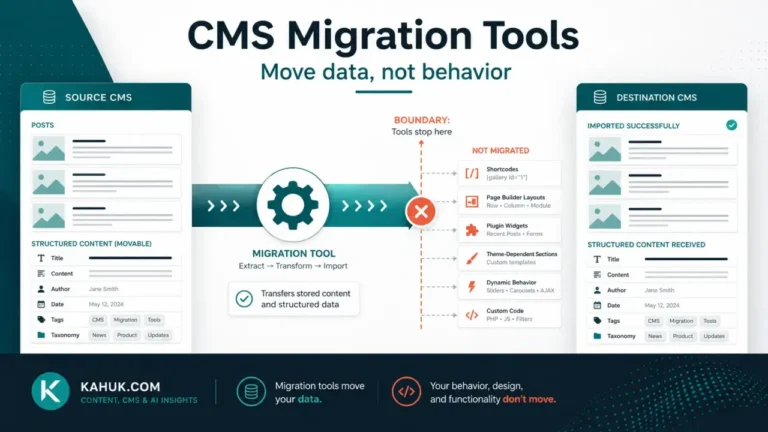
Direction one: your posts carry things the new model cannot hold. Custom fields, plugin-generated metadata, per-post overrides, unusual post types, and formatting that only renders on the old platform. These get silently dropped during import, which is the failure mode people notice months later. This is the same family of loss covered in what happens to your shortcodes, blocks and embeds and in the metadata everyone forgets.
Direction two: the new model demands things your posts never had. This is the direction that actually stops the project, and it gets far less attention. An empty required field is not a cosmetic gap. On many structured platforms it is a validation error, and a validation error on import means the post does not land at all.
The second direction is worse for a small publisher because it scales with your archive. Dropping a field affects the field. An unfillable required field affects every post you own.
The four kinds of mismatch, and what each one costs
Work through your new model field by field and put each one in a row. This is the table that decides your timeline, and it is worth doing on paper before anyone opens an import tool.
| Kind of mismatch | Example | Honest cost |
|---|---|---|
| Derivable | Reading time, excerpt, slug, first image as hero | Near zero. It can be computed from content you already have, once, in the export |
| Defaultable | Article type, content language, a topic that is genuinely the same for all old posts | Low. One value applied across the archive, revisited later if it matters |
| Extractable, with effort | Author bio and headshot currently typed into the bottom of each post body | Moderate and technical. It works only if the old convention was consistent, and it never was for the whole archive |
| Genuinely absent | A required subtitle, a per-post hero caption, a structured “key takeaway” | High and unavoidable. Somebody types it, once per post, or the field does not get filled |
The fourth row is where projects quietly die. Nine hundred posts times two minutes of typing is thirty hours of work that nobody scheduled, and it is usually discovered after the export is already done.
The rule most modeling advice will not give you
Here is the part the category avoids, and it is worth stating plainly: shrink the new model to what your archive can actually populate, then grow it for new content only.
Almost everything written about content modeling is published by CMS vendors, and it is written for a team designing a model for content that does not exist yet. In that situation, an ambitious model with rich required fields is good practice. You are not in that situation. You are attaching a model to an archive that was written under different rules and cannot be consulted, because the people who wrote those posts have moved on and the context is gone.
So the working rule is: if a field cannot be filled for the archive, it must not be required. Make it optional, populate it going forward, and let the old posts carry it as empty. A model that blocks your own history from importing is not a strict model, it is a broken one.
There is a corollary that catches people six months later. A required field that you fudged during migration with a bulk default is now required on every new post too. Your writers will meet it every single time they publish. Decide whether that friction is worth it while you are still designing, because unpicking a required field after the archive has landed on it is much harder than not adding it.
Where the model and the taxonomy collide
Classification deserves its own pass, because the model usually changes its shape rather than just its fields.
Many structured platforms do not have the WordPress split between categories and tags. They have references to taxonomy records, or a single tag field, or nothing at all until you build it. That is not a field mapping, it is a redesign, and it is covered in full in why categories and tags never survive intact. Settle it during modeling rather than during import, because the taxonomy decides how your archive pages are built on the new platform and it is the least reversible thing in the whole model.
The same applies to authors. A name typed as text and an author record you reference are different data. If the new model wants the second and your archive has the first, you need an author record for every byline in your history, including the guest writer who contributed twice in 2019, before the import can resolve them.
A workable sequence
- Inventory what you actually have, not what you think you have. Every post type, every custom field in use, every taxonomy, every byline. Counts matter here: a field used on eleven posts is a different decision from one used on eleven hundred.
- Draft the destination model, then immediately test each field against the table above.
- Cut everything that lands in the “genuinely absent” row unless you are willing to fund the typing. Make it optional if you want it for future posts.
- Write the mapping down as an explicit old-field to new-field list, including the fields you are deliberately dropping. The deliberate drops are the important part, because an undocumented drop is indistinguishable from a bug later.
- Run it on a sample. A test migration on 20 posts chosen to include your oddest content will find model problems that a clean sample never will. Pick the post with the weird layout, the one with three authors, the one with no featured image.
- Only then export and import the full archive.
Step five is where the time is saved. Model problems found on 20 posts cost an afternoon. The same problems found on 900 posts cost the migration.
What this article does not cover
Choosing which platform’s model suits you is a different question, answered before this one, and it belongs with the work of choosing a CMS rather than with migration mechanics. Building or querying a content model in code is developer work and out of scope here. The general shape of the move, and what survives it, sits in the CMS migration guide.
FAQ
What is a content model in a CMS?
It is the set of content types your CMS allows and the fields each type contains. A loose model like WordPress default posts holds most of the meaning inside the body text. A structured model separates that meaning into named fields, which is more useful going forward and harder to satisfy retroactively.
Why do my old posts fail to import into a new CMS?
Most often because the destination model marks a field as required and your archive has no value for it. Validation rejects the post rather than importing it partially. Making the field optional for the import, then filling it for new content only, resolves most of these cases.
Should I restructure my content during the migration or afterward?
Decide the structure before, populate it after. The model has to be settled before import because it determines what the import can accept, but filling optional fields on old posts is ordinary editorial work that can happen at any pace once the content has landed.
Can an import tool create fields that did not exist before?
It can derive them from what you already have, such as an excerpt from the first paragraph or a hero image from the first image in a post. It cannot invent information that was never recorded anywhere, which is why a required subtitle on a fifteen year old archive is a typing job, not a mapping job.
How do I handle author information that is written inside the post body?
Extract it only if the convention was consistent enough to detect reliably, and expect it to be consistent for part of the archive rather than all of it. Otherwise create the author records manually, which is usually a short list even for a large archive, and accept some manual assignment.
Written July 2026 against generally documented content modeling behavior across current CMS categories. Individual platforms change their field types and validation rules regularly, so verify against your destination platform’s own documentation.