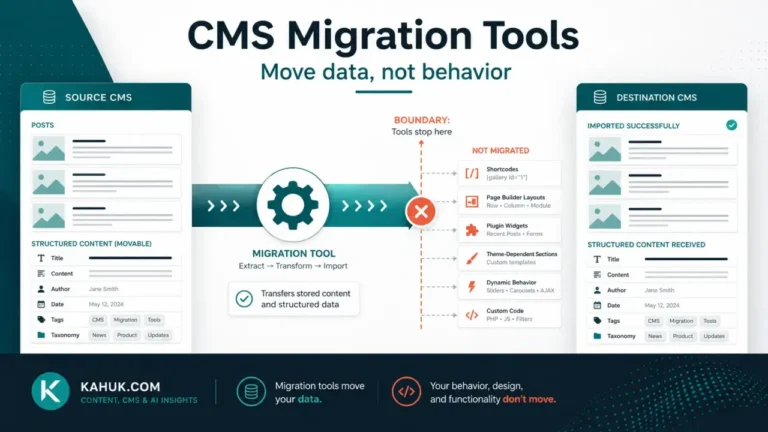
To export content from a CMS in a form you actually own, take the platform’s native export, then verify three things it probably did not include: your media files, your structure, and your ability to read the file without the vendor’s software. Most native exports produce a text file that references images by URL rather than containing them, so the export looks complete and stops being usable the day the old site goes offline. A complete export is text plus media plus a written note of how they relate, stored somewhere the platform cannot reach, and opened at least once to confirm it works.
Before you export anything as part of a live migration, take a full backup of the site and verify that you can restore it. An export is not a backup. Export gives you your content in a portable format; a backup gives you your working site back. They fail differently and you need both. The rollback plan for a specific migration is a separate piece of work, covered in the backup and rollback plan, and nothing in this article replaces it. Never cancel a hosting account, delete a source site or close a vendor subscription on the strength of an export you have not opened and checked.
This is the most reusable article in this cluster, because unlike the rest of it, the habit here is worth having when you are not migrating at all.
Export and backup are different jobs
It is worth separating these clearly, because the words get used interchangeably and the confusion is expensive.
| What it is | What it protects against | Format | |
|---|---|---|---|
| Backup | A restorable copy of the site as it runs: database, files, configuration | Something breaking. You want the same site back | Platform-specific, often useless elsewhere |
| Export | Your content in a documented, portable format | Something ending. You want the content, on something else | Open format, readable without the platform |
A backup is tied to the platform that made it. If the platform is what you are trying to leave, or the company behind it is what you are trying to survive, the backup is not the thing that saves you. That is what an export is for, and it is why a standing export habit is worth building even on a site you have no plans to move.
The four-part completeness test
Run this against any export before you trust it. Most exports pass part one and fail at least one of the others.
1. Does it contain the text? Titles, body content, dates, authors, publication status, excerpts. This is the part every export gets right, and it is why exports feel complete when they are not.
2. Does it contain the media, or only links to it? This is the one that catches people. Many CMS export files store images as URLs pointing back at the old site. That works fine while the old site is up, which is why the problem stays invisible during a normal migration, and it means the export becomes a file full of dead references the moment the old host is switched off. WordPress’s own support documentation is explicit that its export file refers to media rather than containing it, and most structured platforms behave the same way. Downloading the media library separately, as actual files, is a second and independent step. What happens next is the subject of what happens to your images when you move platforms.
3. Does it contain the structure? Categories, tags, custom fields, post types, the relationships between them and the byline records behind author names. Text-only exports such as a plain CSV of posts commonly drop all of this, and it is the part that is hardest to reconstruct because it is not visible in any single post. See the metadata everyone forgets for what tends to go missing here.
4. Can you open it without the vendor? Take the file to a machine with no account, no plugin and no subscription, and open it. If you can read your own words in it with an ordinary text editor or spreadsheet, you own it. If it only opens inside the product, you have a hostage, not an export.
An export that passes all four is portable. One that passes only the first is a text file with sentimental value.
Which formats last
Formats matter less for elegance than for how long they stay readable. Roughly, from most durable to least:
- Plain text and Markdown files, one per post. No parser required, readable by a human forever, and trivially convertible. The weakest at carrying structure, which has to live in the filenames or in a small companion file.
- JSON or XML. Structured, self-describing, widely supported and readable in a text editor when you have to. This is what most platform exports produce and it is a reasonable place to be.
- CSV. Fine for flat data, poor for anything nested. Long post bodies with commas, quotes and line breaks inside CSV cells are a recurring source of corruption. Usable, but check a long post carefully after any round trip.
- A database dump. Complete but tied to the platform’s schema. This is a backup wearing an export’s clothes.
- A static HTML capture of the rendered site. Genuinely useful as a last-resort reading copy of what the site looked like. Poor as a source to import from, because the content and the presentation are welded together.
There is no single right answer. A practical setup is a structured export in JSON or XML for machines, plus a folder of Markdown or text files for humans, plus the media as files. The redundancy costs almost nothing and each covers the others’ failure mode.
What almost every export leaves behind
Set expectations honestly. Even a good export commonly does not include:
- Comments, or comments without their threading and author details
- Redirects that were configured at the platform or plugin level rather than stored with content
- Subscribers and email lists, which usually live in a separate system and need their own export
- Analytics history, which belongs to the analytics provider, not the CMS
- Formatting that was platform-specific: shortcodes, blocks and embeds that only render where something knows how to interpret them
- The visual design, which is the theme, not the content
None of these is a reason to skip the export. They are reasons to know what your export is, so that its gaps are decisions rather than discoveries.
Making it a habit rather than an event
This is the difference between this article and the rest of the migration cluster. Everything else here is done once, under pressure, because you are moving. An export habit is done calmly, repeatedly, when nothing is wrong, and its entire value is that it already exists on the day something is.
A workable routine, at whatever interval suits how often you publish:
- Run the native export. Whatever the platform provides is the fastest complete-ish source of your text and structure.
- Download the media separately, as files. Confirm the file count roughly matches what the library reports.
- Store both somewhere outside the platform. A different provider, not just a different folder on the same host. An export that lives only on the server you are trying to survive is not an export.
- Open it. Once. Read a post. Check that a post from five years ago is in there, not just recent ones.
- Write a one-page note saying what the export contains, what it does not, how media relates to posts, and where the files live. Future you will not remember, and the note is the difference between an archive and a mystery folder.
Do this three times a year and the worst platform outcome available to you becomes an inconvenience.
Why this matters more than it used to
Platforms get acquired, change pricing models, deprecate features and occasionally close. Nobody can tell you which ones, and this article is not going to guess. What is knowable is the asymmetry: the cost of holding a current export is an hour a few times a year, and the cost of not holding one, on the day you need it, can be your entire archive.
You do not need to distrust your platform to keep an export. You need to be the kind of operator whose content survives decisions made by other people. If you are weighing a move at all, this habit is also what makes the move optional rather than urgent, which is worth reading alongside the migration guide and the question of how your classification will translate in categories, tags and taxonomies.
FAQ
Does a CMS export include my images?
Usually not as files. Most native exports reference images by URL, which resolves correctly while the old site is online and breaks when it is not. Download the media library as a separate step and store it alongside the export.
Is an export the same as a backup?
No. A backup restores your working site on the same platform. An export gives you your content in a portable format you can take elsewhere. Keep both, because they protect against different things.
What is the best format to export content in?
JSON or XML for structure, plain text or Markdown for durability, media as actual files. Avoid relying on CSV alone for long post bodies, since commas, quotes and line breaks inside cells corrupt easily on a round trip.
How often should I export my content?
Often enough that losing everything since the last export would be annoying rather than devastating. For most small publishers a few times a year is reasonable, with an extra export immediately before any significant change to the site.
How do I know my export actually worked?
Open it on a machine with no access to the platform. If you can read your own posts in an ordinary text editor and find the media files on disk, it worked. If it only opens inside the product that made it, it has not been tested yet.
Written July 2026. Export capabilities differ by platform and change over time, so check what your own CMS’s export includes against its current official documentation rather than assuming it matches the general pattern described here.