The demo was fine. Somebody clicked through it, everything worked, and everyone in the meeting nodded.
Then the platform arrives and the person who actually writes the posts cannot get an image into an article, and the answer to every question is “ask the developer”.
The demo was not wrong. It was run by someone who already knew where everything was, on content that was designed to demonstrate the product. That is not the same activity as publishing your content, and the gap between the two is where most platform regret comes from.
Here is a test that closes the gap, and it takes an hour.
Set it up properly
Three rules, and the test is worthless without all three.
The person doing it is the person who will do it. Not you, not the developer, not the most technical person on the content team. The least technical person who will need to publish independently. That person sets the ceiling on the whole platform, and this site’s own delivered work on team workflow found the same thing: the least technical publisher decides what the process can be.
They get what they would actually get. A login, and whatever documentation or training the vendor provides. Not a walkthrough from you, and not you sitting beside them. If you have to be there, you have learned something already.
You watch and say nothing. This is the hardest rule and it is the one that produces the finding. Write down where they hesitate, what they click that does not work, and what they ask. Do not answer. The questions are the result.
The task
One real article. Not a placeholder, not a demo. Something from your actual editorial queue, with everything a real article has.
Ask them to do all of this, unaided:
- Create a new article and give it a title.
- Paste in the body text from wherever your writers actually write it. If they draft in a document, paste from that document, because pasted formatting is where a large proportion of real editorial pain lives.
- Add an image, including whatever alt text and caption your site uses.
- Add a link to another article on your site.
- Assign it to whatever categories or tags you use.
- Add the metadata your site needs: a summary, a social image, whatever else.
- Preview it and see what it will look like.
- Save it as a draft, close everything, come back, and find it again.
- Publish it, or schedule it if that is how you work.
- Find it once it is live, and make one small correction to a typo.
Steps eight, nine and ten are the ones people leave out of an evaluation and they are where platforms differ most.
What to write down
Not “was it easy”. Specific observations.
Where did they stop? Every pause of more than a few seconds is a place the interface did not tell them what to do next.
What did they ask? Every question is a question they will ask again, of somebody, forever.
What did they get wrong without noticing? This is the most valuable category. A field left empty, an image inserted at the wrong size, a category assigned that does not exist in your taxonomy. Errors that pass silently are worse than errors that block, because they ship.
What did the paste do to the formatting? Bold, links, headings, lists. If pasted content arrives broken, every article on your site will need cleaning up by hand, forever.
Could they find the draft again? More platforms fail this than you would expect.
Did anything require leaving the interface? A terminal, a file browser, a git client, a separate deployment step. If the answer is yes, the honest question is whether that is acceptable rather than whether it is learnable. This site has a whole article on that specific question, because it is the fault line in one whole category of platform: will your writer be able to publish?
The failures that pass every check
The most useful thing this test finds is the class of problem a feature comparison cannot.
A platform can have every feature on your list and still be unusable, because the features are present and the path between them is not. A field exists but it is on a different screen. Images upload but the alt text is three clicks away and nobody finds it. Categories work but assigning one requires knowing its exact name.
None of that shows up in a comparison table, and all of it shows up in the hour.
The same shape recurs across this site’s migration work: the check passes, the count is right, and the thing you actually needed is gone. What actually breaks during a CMS migration is the migration version of the same lesson, and the underlying point is identical. The check you would think to run is not the check that catches the failure.
The second hour, if the first one went well
If the platform survives, run one more test with the same person.
Have them do something the content model did not anticipate. An article with two authors. A post that needs a pull quote. An update to something published a year ago. Real editorial work is full of these, and a platform that handles the standard case beautifully and the exception not at all is a platform you will fight weekly.
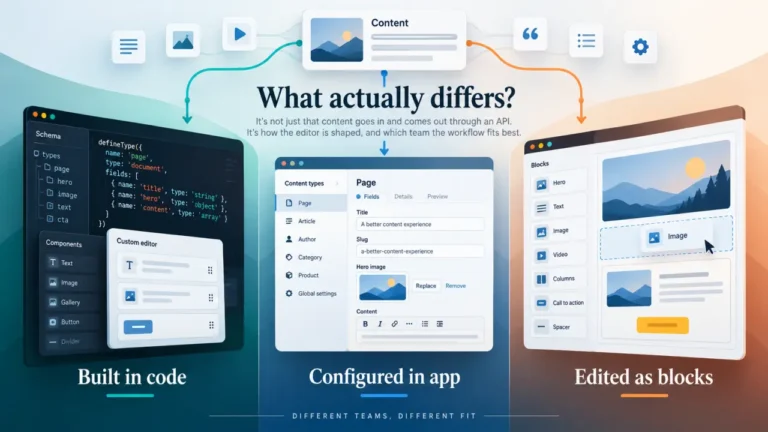
Have them change something structural. Add a field to a content type, if that is meant to be possible without a developer. Whether it is possible, and who has to do it, is one of the largest practical differences between platforms in this category, and it is worth establishing before you commit rather than in month three. Content model migration covers why a model that lives in code and a model that lives in a UI behave so differently.
What the result actually tells you
Three possible outcomes and each has a clear meaning.
They completed everything unaided. Good. That is a real finding and it is rarer than vendor demos suggest.
They completed it with questions. Fine, if the questions are one-time learning rather than recurring dependency. The distinction is whether the answer is “here is where that button is” or “you will need to ask a developer”.
They could not complete it. Then the platform requires a developer in the publishing loop, permanently. That may be acceptable, and it must be a decision rather than a discovery. Every article, forever, needs the second person to be available.
Why nobody runs this test
Because it is faster to read a comparison and because the result can be inconvenient. A platform the technical team likes can fail this test, and then somebody has to say so.
It is worth saying so. The launch takes two weeks and the operating takes years, and this test measures the years. That is the argument this site’s pillar makes about the whole decision: how to choose a CMS without reading 165 vendor pages starts from who publishes and how often, rather than from features, for exactly this reason.
The short version
- The demo was run by someone who already knew the answers. That is not the test.
- The least technical person who will publish sets the ceiling. Test with them.
- Give them one real article and ten steps, unaided, and say nothing while you watch.
- Record where they stopped, what they asked, and what they got wrong silently.
- Steps eight to ten, find the draft again and fix a typo after publishing, are where platforms fail.
- If the answer to any step is “ask a developer”, that is the permanent arrangement, not a training gap.