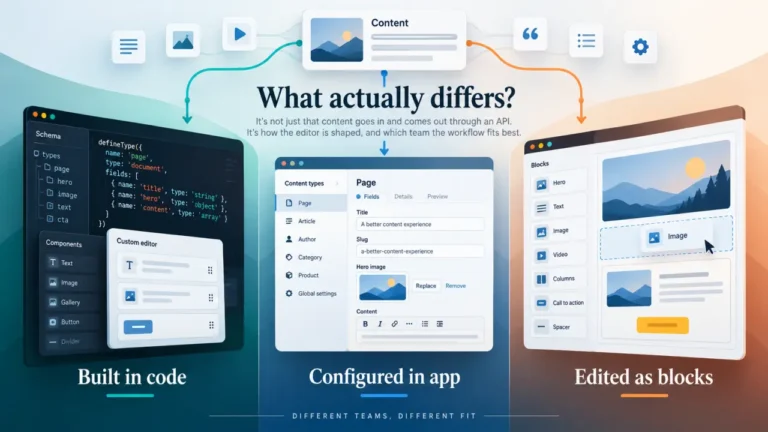
The vendor page says no code required. Your last three support requests went to a developer. Both of those statements are true, and the reason they are both true is that they are talking about different tasks.
“No code” almost always means publishing. It rarely means changing anything about how publishing works. That distinction is the whole answer, and this page is about where the line falls in each kind of platform.
One thing this article will not do: describe what the developer would actually do. That is a different subject with a different owner. This is about which tasks need one, so you can decide whether that arrangement works for you.
The two categories every task falls into
Sort every task you can imagine into one of these and the picture clarifies immediately.
Using the system. Writing, editing, uploading images, assigning categories, scheduling, previewing, publishing, fixing a typo on a live page.
Changing the system. Adding a field to a content type, creating a new content type, changing how something is displayed, adding a page template, integrating another service, changing a URL structure, adding a locale.
Almost every platform in this category is genuinely good at the first list. The differences are entirely in the second, and the second list is what generates the tickets.
By platform type
The honest answer varies by architecture rather than by vendor, which is useful because architecture is stable and product features are not.
Traditional all-in-one platforms. Publishing needs nobody. A lot of the second list also needs nobody, because the ecosystem has an interface for it. Where a developer is needed, it is usually for something genuinely custom.
Visual builders with a CMS attached. Publishing needs nobody, and a meaningful part of the second list is also self-service, because the point of the product is a visual interface over structure. The limits, when they arrive, tend to be hard rather than negotiable: a thing is either supported or it is not, and when it is not, no amount of developer time inside the product changes that.
API-driven headless platforms. Publishing needs nobody, and this is the point of the category. Everything the reader sees is a separate application, so every change to how content appears is a developer task, permanently. That is not a shortcoming, it is the architecture: the front end is a different program, built and deployed separately. What “headless” actually means if you are not a developer covers that separation and why it is the defining property.
Git-based platforms. This is the category where the first list can also need help, which is the thing to establish before committing. Publishing may involve a version control operation, and whether that is acceptable depends entirely on who is doing it. This site has an article specifically on that fault line: will your writer be able to publish?
Self-hosted anything. Publishing needs nobody. Operating needs somebody permanently, and that is a separate role from making changes: updates, verified backups, monitoring, incidents. Self-hosted or cloud: who is on call at 2am works through it, and the deciding question is whether you can name a second person.
The tasks that generate tickets
Whatever the platform, these are the requests that come up in a real content operation, and they are worth checking one by one during evaluation.
Add a field to a content type. The single most common request in the first year, and the answers range from a click to a code change, a deploy and a data migration. Content model migration covers why the same change is trivial in one architecture and a project in another.
Create a new type of page. Almost always a developer task once a front end is separate.
Change how something displays. In a coupled platform, sometimes a setting. In a decoupled one, always a front-end change.
Add a redirect. Frequently not the CMS’s job at all, which surprises people.
Add a locale. Rarely as simple as switching one on.
Integrate a form, a search, a newsletter. Under a headless architecture, each of these is a separate service and an integration. What you lose when you go headless covers why the bundle reappears as a list of line items.
Change a URL. Depends entirely on where routing lives.
Ask about each of these specifically. “Does this need a developer” gets a general answer; “who adds a field to an existing content type” gets a real one.
How to find out before you commit
Two tests, both short, and between them they answer most of it.
The publishing test. Give the platform to the least technical person who will use it and have them publish one real article unaided. This is worth an hour and it settles the first list completely: can a non-developer actually publish on this? is the protocol.
The change test. In a trial, try to do three things from the ticket list above yourself, without a developer. Add a field to an existing type. Change how one thing displays. Add a redirect. Where you get stuck is exactly where your team will get stuck, and how often you would need each one is your ticket volume.
Then ask the vendor, in writing, the same three questions and compare their answer to your experience. A gap between the two is itself a finding.
The arrangement, stated honestly
For most content teams the realistic answer is not “yes” or “no”. It is “yes, occasionally, and the question is how quickly.”
If a developer is available within a day, needing one for a content type change is an inconvenience. If the developer is an agency with a two-week queue, the same requirement means your content model is effectively frozen, and a frozen content model shapes what you can publish.
So the useful question is not whether you need a developer. It is:
- Who is it, by name?
- How fast can they respond, realistically?
- What does that cost, per change or per month?
- What happens when they are unavailable?
- How many of these requests will there be, based on the change test above?
Those five answers tell you whether the platform is workable for your team. A general “no code required” tells you nothing.
The cost nobody counts
If every content model change waits for a developer, the real cost is not the developer’s time. It is the changes that never get requested because asking is too slow.
That is invisible in any budget and it shapes the site over years. A team that can adjust its own content model experiments; a team that cannot publishes what the original model allowed, indefinitely.
Worth weighing against whatever the decoupled architecture was chosen to deliver, and worth being honest about, because it is the sort of cost that only becomes visible in retrospect.
The short version
- “No code” means publishing. It rarely means changing how publishing works.
- Sort tasks into using the system and changing the system. Every platform is good at the first.
- Headless means the front end is a separate application, so display changes are permanently a developer task.
- Git-based platforms can need help with publishing itself, which is the thing to establish first.
- Self-hosted needs an operator permanently, which is a different role from a change-maker.
- Ask the five questions about your actual developer: who, how fast, what cost, what if unavailable, how often.
- The uncounted cost is the changes nobody bothers to request.